Guide · updated 10 September 2026 · 9 min read
WordPress to Shopify Blog Migration: A Safe Checklist
Move a WordPress blog to Shopify with a source inventory, WXR export, content and media review, one-to-one redirects, canonicals and measurement checks.
A blog migration succeeds when every important old URL has an intentional outcome. Moving article text is only one part. You also need to preserve publication state, authorship, dates, media rights and files, internal links, taxonomy, canonical signals, measurement continuity and reader access through redirects.
Download the blank migration map. Use one row per WordPress URL, including pages you decide to hold or retire. A missing row is an unreviewed outcome.
Citelift does not currently provide a WordPress importer. The worksheet and synthetic fixtures support an operator who uses manual entry, a migration app or a separately authorized API integration. They do not connect to WordPress or Shopify, and they make no merchant-store changes.
Freeze a recoverable source inventory
Choose a content freeze or record the last WordPress edit timestamp so late changes do not disappear between exports. Before transformation, preserve:
- a WordPress database backup appropriate to the host;
- the uploads/media library files, including originals;
- the active theme and plugin list needed to interpret custom content;
- a WordPress Tools → Export WXR file;
- a crawl or inventory of live URLs, canonicals, titles, descriptions, status codes and redirects;
- analytics and Search Console exports for a stated complete window;
- the permalink pattern and any server/CDN redirect rules;
- author, publication date, update date, categories, tags, comments, excerpts and featured-image references.
WordPress documents WXR as an XML export containing posts, pages, custom post types, comments, custom fields, categories, tags, custom taxonomies and users. The export screen can filter posts by category, author, date and status. WordPress Tools Export documentation, accessed 10 September 2026.
Do not treat the XML file as the only media backup. WordPress's own import workflow offers a separate “Download and import file attachments” option, which means a receiving process can still depend on reachable source attachments. Preserve owned originals and keep the source available until every retained asset has been copied and checked. WordPress importing documentation, last updated 7 July 2025 and accessed 10 September 2026.
Store backups outside the public web root and follow the site's privacy and retention duties. WXR can contain author details, comments and custom fields that should not be published or placed in a code repository.
Decide the Shopify transfer method
Shopify's current migration guide lists five broad methods: copy content, use supported CSV routes where available, choose a migration app, hire a Shopify Partner, or build a custom API solution. Its data table lists migration apps and the Blog and Blog Article APIs for blogs. It does not list a generic native blog CSV import. Shopify migration guidance, accessed 10 September 2026.
Choose based on article count and HTML complexity:
| Method | Appropriate when | Review burden |
|---|---|---|
| Manual copy and edit | A small library needs substantial editorial cleanup | Slow, but every article can be reviewed in context |
| Migration app | The app explicitly supports the WordPress data and Shopify fields you need | Verify permissions, data handling, mapping, retries and ownership before use |
| Custom API process | A large or specialized migration has engineering ownership and authorized Shopify access | Requires idempotency, rate-limit handling, error logs, permissions and safe reruns |
Do not test an importer against the full production library first. Use a private or hidden destination where appropriate, select representative articles, and inspect the rendered result. The pilot should include a simple post, headings and lists, an internal link, an image, an embed, a shortcode or plugin block, a draft, a non-ASCII title and a post with several taxonomy terms.
Map WordPress URLs to Shopify's blog structure
WordPress permalinks vary. A post might be /2025/03/linen-care/, /category/care/linen-care/ or simply /linen-care/. Native Shopify articles follow:
/blogs/[blog-handle]/[article-handle]
Create the target blog and handle plan before importing articles. Check target-handle collisions, reserved or already-used URLs, and whether two old posts are being consolidated. For every published source, record one of these outcomes: migrate, merge, redirect, intentionally return not found, or hold. Use the content audit workflow to make that decision with evidence.
When the old and new content will share the same public domain after cutover, Shopify URL redirects can map old paths to new article paths. If WordPress remains on a different host or subdomain, a redirect configured only inside Shopify cannot answer requests that still go to the old server. Keep control of that origin and configure its permanent redirects as part of the domain plan.
Avoid patterns that send every old post to /blogs/news or the home page. The target should satisfy the old reader need. Point sources directly to the final URL, not through chains. Google's site-move guidance, updated 20 August 2026, recommends a URL map, permanent redirects, self-referencing canonicals on new pages, updated internal links and long-lived redirects; it warns against irrelevant mass redirects.
Follow the Shopify URL and redirect guide for current admin constraints and verification. Shopify says a redirect source must be broken before its redirect works, and its current admin supports CSV import/export for URL redirects. Shopify URL redirect documentation, accessed 10 September 2026.
Transform content without carrying broken WordPress behavior
WordPress body HTML can contain Gutenberg comments, plugin shortcodes, page-builder wrappers, forms, scripts, inline styles, gallery IDs and relative media paths. Shopify will not automatically reproduce the PHP or plugin that made those tokens work.
For every pilot article:
- Parse the source as data; do not execute shortcodes or scripts during migration.
- Preserve the heading hierarchy, lists, tables, quotations and link meaning in clean HTML supported by the destination.
- Replace shortcode galleries, forms and embeds with reviewed Shopify-compatible content.
- Rewrite internal WordPress URLs to the final mapped Shopify URLs.
- Copy retained media to an owned destination and replace
wp-content/uploadsreferences. - Preserve the original publication date where the chosen method and Shopify fields support it; record any field that cannot be retained.
- Map authors to real permitted Shopify staff authors or document the editorial fallback. Do not invent a byline.
- Keep drafts hidden. A source
draft,private,pendingor scheduled state is not authorization to publish.
Preview the saved Shopify article because stored HTML and rendered theme output are different evidence. Check mobile overflow, tables, captions, outbound links, product links, embedded media and any source attribution.
Move media with rights and context intact
Download retained images from the owned source, verify the original file, and scan for missing or duplicate assets. Map featured images separately from in-body images. Preserve meaningful alt text only when it accurately describes the image's new context; an old filename or SEO phrase should not become alt text by default.
Choose the image size from the rendered slot and let the Shopify theme produce responsive candidates. Keep dimensions to reduce layout shift and avoid lazy-loading the initial hero. Replace unsupported players with an approved embed or a normal source link, and put decision-critical instructions in text. The Shopify images and video guide covers rights, contextual alternatives, responsive images and deferred video.
Check PDFs and other downloads as URLs in the map. If people or external sites linked to a WordPress attachment page, decide whether that exact request should reach the file, an explanatory page or a not-found response.
Translate categories and tags deliberately
Export WordPress categories, tags and counts, but do not copy them blindly. For each term, choose:
- a distinct Shopify blog when it represents a durable publication with its own audience or policy;
- a Shopify article tag when it supports a stable reader-facing filter;
- an ordinary navigation label when only a shortcut is needed;
- an internal note or retirement when it has no storefront purpose.
Hierarchical WordPress categories do not become a Shopify hierarchy by themselves. Shopify filtered blog URLs use /blogs/[blog-handle]/tagged/[tag-handle], and visible controls depend on the theme. Review the Shopify tags and categories guide before creating hundreds of thin filtered combinations.
Preserve measurement without pretending histories moved
Annotate the freeze, pilot, cutover and redirect dates in the analytics tools you actually use. Keep the same Google Analytics property and tag only when that matches the organization's measurement plan; verify realtime collection on the new theme. Save pre-migration page-level exports because historical tools can continue to report old URL dimensions even after the content moves.
Verify the Shopify domain/property in Search Console, submit Shopify's generated sitemap, and watch old and new URL groups separately. Shopify says its sitemap.xml automatically includes blog posts and updates when pages and articles change. That supports discovery; it does not guarantee indexing or stable rankings. Shopify sitemap migration guidance, accessed 10 September 2026.
Track redirect errors, not-found requests, Search Console impressions/clicks, landing sessions and business outcomes separately. Expect some recrawl and reporting delay. Compare equal complete periods and note seasonality, campaigns and product changes that occurred during the move.
Run a pilot, cut over, and keep a rollback path
Before launch, validate a representative batch end to end:
- source and target titles, bodies, authors, dates and visibility;
- image ownership, loading and alt text;
- internal and product links;
- one-hop redirects from exact old paths;
- self-referencing canonical URLs in the new page source;
- mobile and desktop rendering;
- analytics collection and sitemap presence;
- held drafts remaining unavailable publicly.
Keep the old site recoverable and avoid simultaneous unrelated redesigns when possible. During cutover, freeze edits, take a final delta export, import only the delta, apply the reviewed redirect map, switch the intended domain routing, and run the same checks from a clean browser and an HTTP client. Record who can restore DNS/origin routing, content and redirects if a material failure appears.
This release includes a three-post synthetic WXR fixture and its expected migration map. The fixture contains two published articles, one draft, an internal link, an image dependency and an unresolved gallery shortcode. The map's target URLs and redirect paths are proposed destinations. Its media, alt-text, internal-link and canonical columns deliberately say not performed, while the QA column describes offline fixture validation only. The checked-in local validator confirmed all three mappings, held the draft, detected the shortcode/media risks and verified five blank worksheets on 10 September 2026. It did not import or publish an article, copy media, rewrite a live link, inspect a Shopify canonical, create or follow a redirect, call either platform or render a real Shopify theme.
What happened when we saved one fixture in Shopify
We manually transferred owned fixture post 102, “Linen care without guesswork,” into the native Shopify editor on 10 September 2026. We added “migration fixture” to the title so the temporary record was easy to identify, chose the existing News blog, added the Linen tag, and saved it as Hidden.
After reloading the saved record, the title, body paragraphs, Linen tag and Hidden state remained. The body still displayed [gallery ids="201,202"] as literal text. It did not become a gallery. That result is a publication blocker: replace the shortcode with reviewed images and appropriate alt text before making a real migrated article visible.
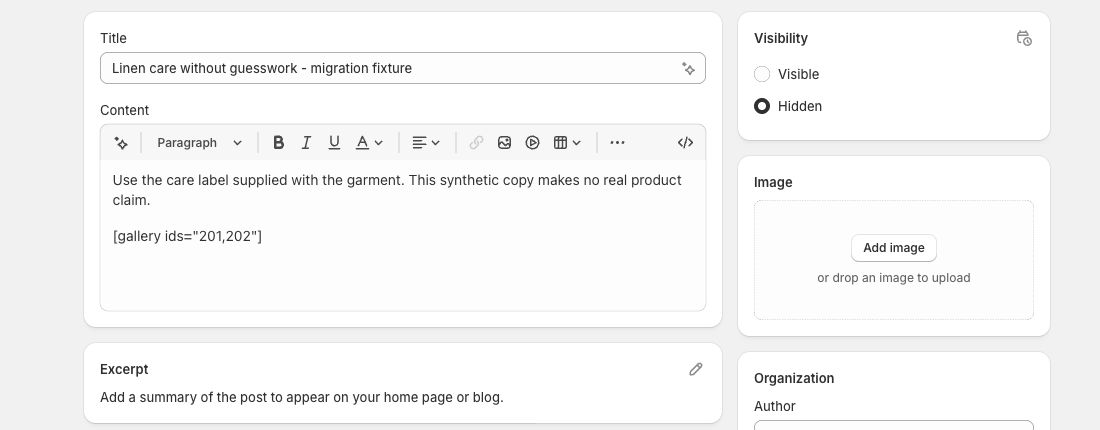
We then deleted this temporary draft and verified that the original two-article list remained. No fixture was published. This was a one-post manual transfer and persistence check, not a WXR importer or a complete migration. We did not preserve the source author or original date, transfer media, test theme rendering, or validate a migrated URL’s canonical and analytics. The separate owned-store redirect check used an existing article and is not evidence that this fixture’s proposed redirect map was applied. The downloadable three-post map therefore retains its offline-only labels.
Use that fixture to test your mapping logic safely, then replace it with a private test export stored outside the public repository. Passing synthetic data proves only that the expected cases were handled. A production migration still needs permission-scoped tooling, backups, a representative pilot and human review.
Questions.
Can Shopify import a WordPress WXR file directly?
Shopify's migration guidance lists copy and paste, migration apps, and the Blog and Blog Article APIs as blog-transfer options. It does not describe a generic WXR upload in the native blog editor. Verify any selected app or custom process against a small test batch.
Does Citelift import WordPress blogs?
No. Citelift does not currently offer a WordPress importer. This guide and its fixtures help a migration owner plan and validate work performed manually, by a migration app, or by a separately built integration.
Will WordPress categories become Shopify categories automatically?
Do not assume that mapping. Shopify organizes articles with blogs and tags. Decide which WordPress terms represent a durable blog, a reader-facing tag, an internal editorial label or metadata to retire.
Should I shut down WordPress as soon as the Shopify articles appear?
Keep a recoverable export, database and media backup, and preserve the old origin long enough to verify content, assets and redirects. Cut over in a controlled window only after the destination and URL map pass review.
Citelift is listed on the Shopify App Store: Citelift on the Shopify App Store.