Citelift / compared with / Bloggle
Citelift compared with Bloggle
Updated · first published 10 September 2026
Bloggle's current Shopify listing centers on a drag-and-drop article builder, templates, product sections and live SEO scoring. Citelift centers on the recurring operation around an article: catalog context, planning, drafting, checks, Shopify delivery and order attribution. The buyer decision is hands-on control of each article’s layout versus a recurring product-grounded publishing workflow. Citelift publishes this comparison. We have not installed Bloggle, so every Bloggle statement below comes from official public pages checked on 25 September 2026.
The short answer
Pick Bloggle if you already have articles, or people to write them, and the job is making each post look good: drag-and-drop sections, templates, product galleries and your theme's styles. Pick Citelift if the job is producing articles week after week from your catalog, with checks before publishing and orders credited to each post.
On 25 September 2026 Bloggle's Shopify App Store listing showed a 4.8 rating from 338 reviews, plans from $19.90 a month and a 14-day free trial. Citelift is new: it has been listed on the Shopify App Store since 5 October 2026 and had no reviews when we checked on 9 October 2026. Its prices are on the pricing page.
Bloggle at a glance
| What Bloggle’s page says | Source | |
|---|---|---|
| Plans | Starter $19.90, Pro $49.90 and Business $79.90 a month, each with a 14-day free trial. | Bloggle on the Shopify App Storechecked 25 September 2026 |
| App Store rating | 4.8 out of 5 from 338 reviews. | Bloggle on the Shopify App Storechecked 25 September 2026 |
| Launched | 26 July 2021, by Bloggle, based in France. | Bloggle on the Shopify App Storechecked 25 September 2026 |
| Core job | A drag-and-drop blog editor with templates, theme-style syncing, live SEO scoring, product embeds, FAQ and table-of-contents sections. | Bloggle on the Shopify App Storechecked 25 September 2026 |
| What changes by plan | Pro adds blog-listing search and navigation, product galleries and one saved section. Business adds a product sidebar, Klaviyo forms, unlimited saved sections and a UX and conversion scoring tool. | Bloggle on the Shopify App Storechecked 25 September 2026 |
| After uninstalling | The listing says every blog is hosted on your store and you keep everything even if you uninstall. | Bloggle on the Shopify App Storechecked 25 September 2026 |
Citelift’s own prices are on the pricing page, read from the same plan ladder Shopify bills. Vendor pages change; if a line here is out of date, tell us and it gets corrected.
Line by line
| Bloggle | Citelift | |
|---|---|---|
| Price | The Shopify App Store listing shows Starter at $19.90, Pro at $49.90 and Business at $79.90 per 30 days, each with a 14-day trial.Source: vendor documentation, 25 September 2026 | Three monthly or annual tiers per store. Current amounts and billing terms come from the same plan ladder Shopify charges and are shown on the pricing page. |
| Primary job | Their listing presents a no-code drag-and-drop editor, templates, theme-style syncing, live SEO scoring and product sections for Shopify blog posts.Source: vendor documentation, 25 September 2026 | Catalog-grounded topic planning, recurring article production, publishing checks and reporting in one Shopify workflow. |
| Article design | Their feature page documents live preview, shared sections, saved templates, responsive previews for desktop, tablet and phone, and an editor that loads your theme's CSS. The listing adds product layouts and blog-list search and navigation on higher plans.Source: vendor documentation, 25 September 2026 | The article renderer selects a structure from the question and content, applies a bounded storefront visual profile and places verified product media. Merchants do not assemble each section in a drag-and-drop editor. |
| Writing input | The listing includes AI generation and import/export. Their feature page also describes importing existing Shopify posts and converting content pasted from Google Docs.Source: vendor documentation, 25 September 2026 | The planner uses catalog and brand context plus buyer questions. Product facts still require merchant verification, and missing or conflicting facts can hold a draft. |
| Product placement | Their pages document selected product sections, product galleries and a product sidebar that a merchant configures in the editor.Source: vendor documentation, 25 September 2026 | Products are selected because they answer the article's buyer question, and product links carry an article identifier used by the order-attribution rule. |
| Publishing control | Their feature page documents saving, publishing and scheduling posts. We have not tested its states or behavior in a custom theme.Source: vendor documentation, 25 September 2026 | Draft, scheduled, live and held states remain distinct. Core and Growth can add an optional approval hold; failed checks can hold drafts on every plan. |
| Ownership after uninstall | The Shopify listing says every blog is hosted on your store and that you keep everything even if you uninstall. Verify layouts and assets on your own theme before relying on that lifecycle.Source: vendor documentation, 25 September 2026 | Published articles live in Shopify, and export remains available after cancellation. Verify the saved Shopify HTML and storefront rendering before ending either subscription. |
| Measurement | The public listing markets live SEO scoring, SEO analysis and keyword optimization, plus a UX and conversion scoring tool on Business. We have not run its reporting, so this does not describe an absence or a measured result.Source: vendor documentation, 25 September 2026 | Search data when eligible, sampled AI-answer mentions and orders attributed to an article are separate reports. Order credit uses available Shopify journey data and does not prove incremental sales. |
Citelift sells one of the products compared. We checked Bloggle's Shopify App Store listing, pricing page and feature documentation on 15 September 2026 and again on 25 September 2026. We did not install Bloggle, inspect a merchant account or time a task, so all Bloggle claims are labeled vendor documentation. An unmentioned capability is unknown rather than absent.
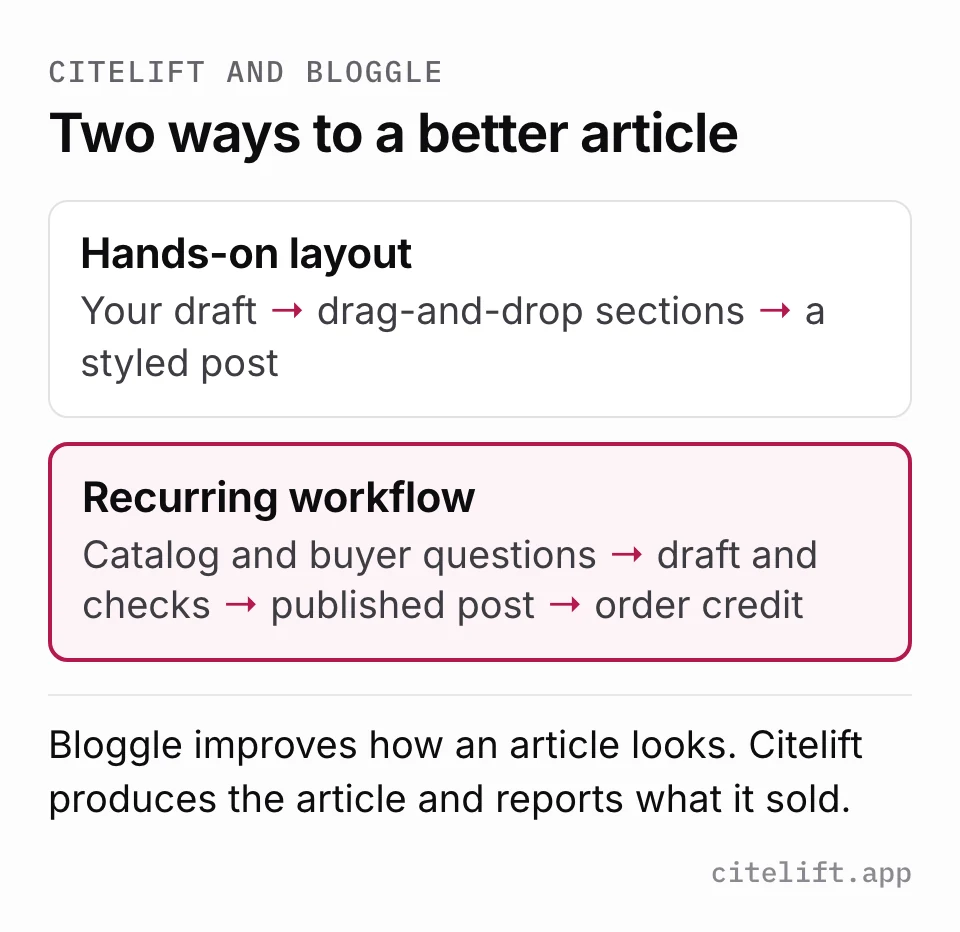
They solve different halves of the same problem
Two different problems can stall a Shopify blog. Either the team has things to say but the default blog template makes every post look like a wall of text, or the template is fine but nobody has time to decide what to write, research it and get it published every week. Bloggle is aimed squarely at the first problem. Citelift is aimed at the second.
Bloggle gives an editor more control than Shopify's native blog: sections you can drag into place, reusable templates, product embeds and galleries, a table of contents and FAQ blocks, and an editor that loads your theme's own CSS so posts match the store. If your posts are recipes, lookbooks, interviews or buying guides that someone on your team writes, that control is the point.
Citelift does the recurring work around an article instead. It plans topics from your catalog and the questions buyers ask, drafts product-linked articles, runs checks on product claims, links and media, and publishes to your Shopify blog on the schedule you choose. It chooses a sensible article structure itself rather than asking you to lay out every section. You get less design control and more of the week back.
Can you use both?
Sometimes. Both end up as Shopify blog articles, so nothing stops a team from letting Citelift produce the regular product guides while a person uses Bloggle for the handful of flagship posts that deserve a custom layout each season. The thing to avoid is two tools editing the same article: a later edit in one can overwrite formatting or product links set by the other.
If you try both, keep a simple rule: each article has one owner tool. Record which one in your article list, and check the storefront version after any edit.
What to check before choosing
For Bloggle, the questions are about your theme and your plan. Does the editor pick up your fonts and buttons correctly? Which of the sections you want are on Starter, and which need Pro or Business? How do posts render on a phone? The listing says content stays on the store after uninstalling; check that on a test post before you depend on it.
For Citelift, the questions are about facts and control. Are the product details in a draft the ones in your admin? When a check fails, does the held draft say why? Do you want the optional approval hold on Core and Growth, or are you comfortable with drafts that pass the checks publishing on schedule? And do you understand that the order credit is an attribution rule, not proof the article caused a sale?
Compare one existing article in both workflows
Use a draft your team already understands and a product with documented facts. This is a reproducible evaluation checklist, not a claim that Citelift installed or tested Bloggle.
- Name the bottleneck before starting: hands-on article design, or recurring topic planning, drafting, checks and measurement. Write one acceptance criterion for each so the trial does not become a feature tour.
- Record the draft, product URL, product facts, source links and current mobile screenshots before changing anything.
- In Bloggle, test the editor, theme styles, product sections, SEO suggestions and publishing controls your chosen plan includes. Time the work and inspect the signed-out storefront result.
- In Citelift, inspect the catalog context, proposed article, product links, automated checks and any held-draft reason. Verify the same facts before approving publication.
- After cancellation or uninstall, verify which HTML, images and layouts remain. Keep search data, AI-answer observations and article-attributed orders as separate measures.
Bloggle Shopify App Store listing (checked 25 September 2026)
Bloggle feature documentation (checked 25 September 2026)
Bloggle pricing (checked 25 September 2026)
Citelift publishes this comparison. The examples are not customer growth results. For the measurement rules behind our reports, read article order attribution and AI visibility measurement.
What you would buy with Citelift
One subscription covers one Shopify store. Connect for free, choose a plan on Citelift and approve the charge in Shopify. An eligible store’s seven-day trial starts at that approval. AI generation begins after approval; review your brand, plan and first draft before completing setup.
| Plan | Monthly USD | Publishing ceiling | Measurement and review |
|---|---|---|---|
| Starter | $49 | Up to 4 per rolling week | AI checks monthly. Automated publishing checks; no optional approval hold or Search Console connection. |
| Core | $99 | Up to 7 per rolling week | AI checks weekly. Optional approval hold and eligible Search Console connection. |
| Growth | $199 | Up to 14 per rolling week | AI checks weekly. Optional approval hold and eligible Search Console connection. |
Failed checks can hold drafts on every plan. Search Console needs a matching verified property and available data. AI checks are samples of answers, and order attribution assigns credit using available Shopify journey data. Neither establishes incremental sales or guarantees rankings. See annual prices and full plan terms.
Our 17-page product-information pilot shows why source facts need manual review: a simple HTML extraction missed care instructions that browser review recovered on three pages. This research did not measure either tool’s output or growth.
Bring the same evidence to either trial
- Save a product URL, its materials or ingredients, its size or quantity, and its care or use instructions. Resolve missing facts before asking a writer to use them.
- Choose one buyer question. Compare both drafts against that same fact sheet, including product links and unsupported claims.
- Record review time and any corrections. If you authorize publication, open the storefront URL while signed out and check Shopify’s visibility state.
- Keep a dated baseline of search clicks, observed AI answers and attributed orders. Record “not available” separately from a measured zero.
Who should pick Bloggle
Pick Bloggle if your team already has articles and the main job is hands-on control over layouts, reusable sections, product galleries and Shopify blog presentation. Test the theme and mobile result you will actually keep.
- Someone on your team writes the posts and wants control over every layout.
- Your theme needs richer blog sections than Shopify's native editor offers.
- You want product galleries, a table of contents and FAQ blocks without code.
- You want an established App Store app with a long public review history.
Who should pick Citelift
Pick Citelift if recurring topic planning and production are the bottleneck, and you want catalog checks, automated quality holds and article-attributed orders in the same Shopify workflow. The app chooses a bounded article structure instead of asking you to assemble every section.
- Nobody has time to plan, research and write a post every week.
- You want articles built from catalog facts and checked before they go live.
- You want a held-draft state with a reason, rather than a silent publish.
- You want orders credited to each article under a stated seven-day rule.
Moving articles between Bloggle and Citelift
Both tools publish into Shopify's own blog, so your URLs do not have to change. The risk is layout, not data.
- Export your Shopify article list with URLs and visibility before changing anything.
- Open five representative Bloggle posts signed out, on a phone and a desktop, and save screenshots as your before state.
- If you plan to uninstall Bloggle, test it on one post first and confirm the layout, images and product blocks still render the way the listing describes.
- Decide which tool owns each article from now on, and do not edit the same post in both.
- Give Citelift your existing article list so it plans new questions rather than repeating covered ones.
- Keep a dated baseline of blog clicks and attributed orders so you can compare before and after.
Questions
How much does Bloggle cost?
Its Shopify App Store listing showed Starter at $19.90, Pro at $49.90 and Business at $79.90 a month, each with a 14-day free trial, when we checked on 25 September 2026.
Does Bloggle write articles with AI?
The listing includes AI generation among its content-creation features. Its focus is the editor and layout rather than planning and publishing a recurring schedule for you.
Does Citelift have a drag-and-drop editor?
No. Citelift chooses an article structure from the question and content, applies a bounded visual profile from your storefront and places verified product media. You can edit the published article in Shopify's own editor.
What happens to my posts if I uninstall either app?
Bloggle's listing says posts are hosted on your store and you keep everything after uninstalling. Citelift's published articles live in Shopify and export remains available after cancellation. Check a test post either way.
Is Citelift on the Shopify App Store?
Yes, since 5 October 2026. It had no reviews when we checked on 9 October 2026, so there is no review record yet to compare with Bloggle's.
Inspect a sample of answers for your store.
See whether ChatGPT names your store for three buyer questions in your category, which competitors it names instead, and which sources it cites. No sign-in needed.