Citelift / compared with / Shopify Magic
Citelift compared with Shopify Magic
Updated · first published 6 September 2026
Shopify Magic is free, it is already in your admin, and Shopify's own documentation covers considerably more than product descriptions: prompted blog titles and blog content, editing, publishing, and scheduling a post to go live later. Use it. What follows is about the distance between a prompted draft and a content programme that runs without being asked.
The short answer
Use Shopify Magic when you know what you want to write and need a first draft of a blog title and body right now. It is free on every Shopify plan and already in your admin. Pick Citelift when the problem is that nobody decides what to write, checks it against the catalog and publishes it every week.
Magic writes when you prompt it; you pick the topic, check the facts and publish. Citelift plans topics from your catalog and buyer questions, drafts product-linked articles, holds any draft that fails a check and credits orders to each article. Citelift is a paid app, listed on the Shopify App Store since 5 October 2026, with prices on the pricing page.
Shopify Magic at a glance
| What Shopify Magic’s page says | Source | |
|---|---|---|
| Price | Shopify says Shopify Magic tools are available for free, regardless of your subscription plan. | Shopify Magic overviewchecked 25 September 2026 |
| Blog writing | In Content > Blog posts, the Generate text icon in the title or content field drafts from your prompt. You edit and save. | Shopify Magic for blog postschecked 25 September 2026 |
| Other uses | Text for pages, product descriptions and email, Inbox replies, media and theme help, among others. | Shopify Magic overviewchecked 25 September 2026 |
| Languages | Available in all languages Shopify supports; Shopify suggests prompting in the language you want back. | Shopify Magic for blog postschecked 25 September 2026 |
| Scheduling | Shopify's blog documentation says you can publish a post immediately or schedule it. | Shopify blog-post guidechecked 25 September 2026 |
| Accuracy | Shopify says you are responsible for the accuracy of everything you publish, even when you use automatic text generation. | Shopify Magic for blog postschecked 25 September 2026 |
| Sidekick | Shopify's admin assistant can create content such as blog posts when you ask. It works within the context of your store and presents changes for your review before applying them. | Shopify Sidekick overviewchecked 26 September 2026 |
Citelift’s own prices are on the pricing page, read from the same plan ladder Shopify bills. Vendor pages change; if a line here is out of date, tell us and it gets corrected.
Line by line
| Shopify Magic | Citelift | |
|---|---|---|
| Price | Included with your Shopify plan.Source: vendor documentation, 25 September 2026 | Three tiers priced per store. The amounts are on the pricing page. |
| What it produces | Shopify's blog-writing guide documents prompted generation of a blog title and blog content, which you then edit and publish. The Magic overview documents the same help across product text, media and other admin workflows, and Sidekick can create a blog post on request.Source: vendor documentation, 26 September 2026 | A 30-day plan and four to fourteen articles a week, written, illustrated, linked and published without you prompting each one. |
| Who decides the topic | You do, every time you prompt it.Source: vendor documentation, 25 September 2026 | The planner uses your catalog, brand context and buyer questions. You can review the calendar and add your own questions. |
| Scheduling | Shopify's blog-post guide documents scheduling a post for a later date and keeping it hidden until then. Magic drafts into that; the scheduling is Shopify's own.Source: vendor documentation, 25 September 2026 | The same states, chosen by the plan rather than by hand, and reconciled back from Shopify so the dashboard shows what your store is actually serving. |
| Checking the draft | The draft is yours to read before you publish it, which is how the documentation describes the workflow.Source: vendor documentation, 25 September 2026 | Automated checks cover product claims, links, structure and media. Failed checks can hold a draft for review. These checks do not replace merchant verification. |
| Measurement | Shopify's own analytics report on the store. The Magic documentation we read does not describe per-article content attribution, and we did not set out to establish what Magic cannot do.Source: vendor documentation, 25 September 2026 | Orders attributed to each article, AI mentions with the prompts, and a Monday email carrying both. |
Every line about Shopify Magic comes from Shopify's own help documentation, first read on 7 September 2026 and re-read on 25 September 2026: the blog-writing guide, the Shopify Magic overview and the blog-post management guide. We added the Sidekick overview on 26 September 2026, because the Magic overview lists Sidekick and it can create blog posts. We did not go looking for things Magic cannot do, and nothing here claims a limit those pages do not state.
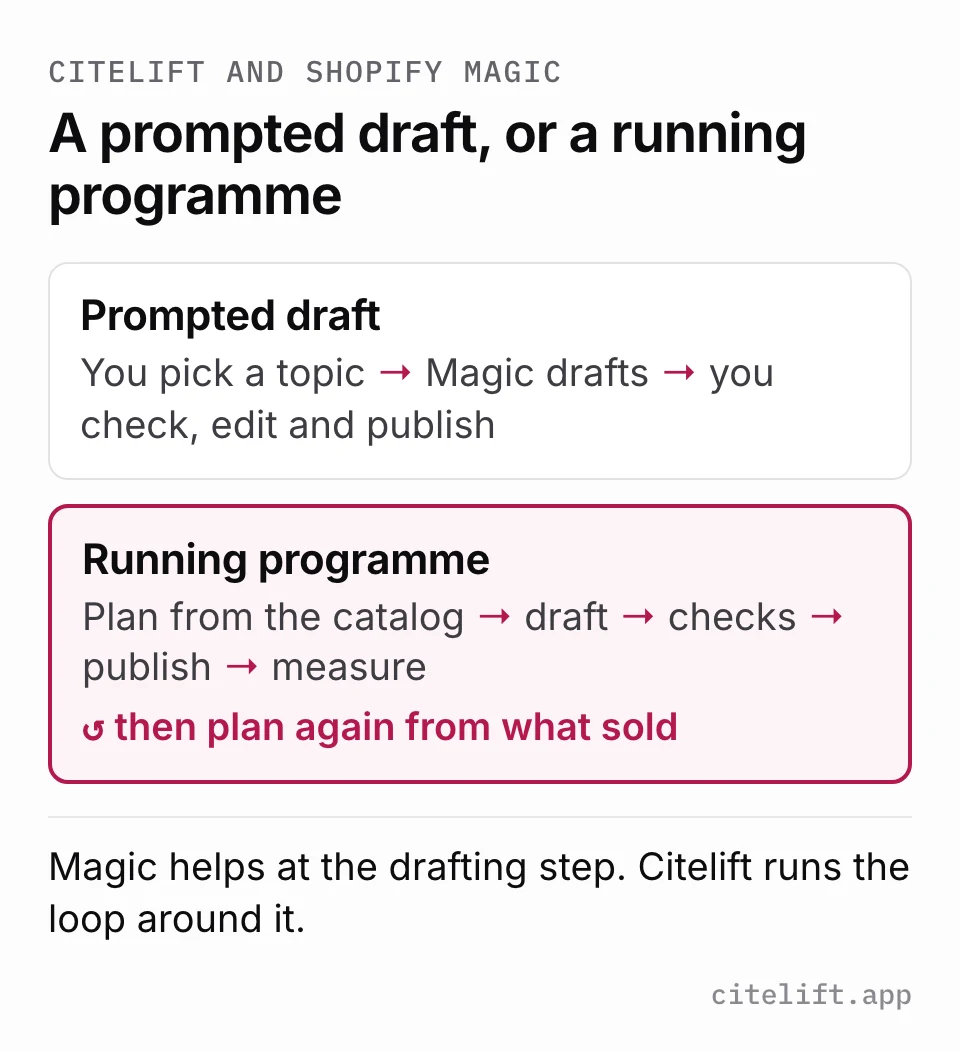
A draft is not a content programme
Shopify Magic is good at the moment of writing. You open a new blog post, click Generate text, describe what you want, and get a title and body to edit. For a founder note, a launch announcement or a care guide you already know the facts for, that is often all you need, and it costs nothing extra.
Shopify's blog documentation describes prompted drafting, and its Sidekick documentation says the admin assistant can create a blog post when you ask. Neither describes deciding what to write next week, checking a draft against your catalog, keeping a publishing schedule running, or telling you which posts sold anything. Those are the jobs Citelift is built for, and the reason it charges.
Where the facts come from
With the blog editor's Generate text button, the facts in a draft come from your prompt and the model, and Shopify warns that generated text can include product benefits you did not list. Sidekick works within the context of your store; we have not tested how closely its blog drafts follow your catalog. Shopify's documentation is plain that you are responsible for the accuracy of what you publish. That is fine when you write the prompt with the product page open beside you. It is easy to get wrong when you are writing quickly about a product with many variants.
Citelift reads the catalog before it writes. Product names, sizes, materials and links in a draft are checked against it, and a draft whose claims cannot be supported is held with a reason rather than scheduled. Those checks cut down the manual review; they do not remove it. You should still read what goes out under your brand.
What each one costs you in time
Magic's cost is your time: choosing the topic, gathering facts, prompting, editing, adding images and product links, and publishing. For one post a month that is manageable. For one a week it becomes a regular block of someone's time.
Citelift's cost is the subscription plus review time. You still review the brand setup and the first draft, resolve held drafts and, if you use the approval hold on Core or Growth, approve each article. We have not measured a universal time saving and will not quote one.
Example: an apparel buying guide
Illustrative task: explain how to choose a linen overshirt using an actual size chart, fabric composition and care instructions. This is a workflow comparison, not a timed performance test or a customer result.
- With Shopify Magic, supply the topic and verified product details, generate the title and body, then review the draft. Shopify’s documentation describes this prompted workflow.
- With Citelift, review catalog and brand context, the proposed content plan and the first draft after plan approval. Check the same product facts before completing setup.
- Choose publishing timing and confirm storefront visibility. Citelift’s weekly allowance is 4 on Starter, 7 on Core and 14 on Growth; automated checks may hold drafts.
- After publication, distinguish search visits from article order credit. Citelift’s attribution uses a seven-day window and matching Shopify journey data, not proof of incremental sales.
Shopify Magic blog-writing documentation (checked 25 September 2026)
Citelift publishes this comparison. The examples are not customer growth results. For the measurement rules behind our reports, read article order attribution and AI visibility measurement.
What you would buy with Citelift
One subscription covers one Shopify store. Connect for free, choose a plan on Citelift and approve the charge in Shopify. An eligible store’s seven-day trial starts at that approval. AI generation begins after approval; review your brand, plan and first draft before completing setup.
| Plan | Monthly USD | Publishing ceiling | Measurement and review |
|---|---|---|---|
| Starter | $49 | Up to 4 per rolling week | AI checks monthly. Automated publishing checks; no optional approval hold or Search Console connection. |
| Core | $99 | Up to 7 per rolling week | AI checks weekly. Optional approval hold and eligible Search Console connection. |
| Growth | $199 | Up to 14 per rolling week | AI checks weekly. Optional approval hold and eligible Search Console connection. |
Failed checks can hold drafts on every plan. Search Console needs a matching verified property and available data. AI checks are samples of answers, and order attribution assigns credit using available Shopify journey data. Neither establishes incremental sales or guarantees rankings. See annual prices and full plan terms.
Our 17-page product-information pilot shows why source facts need manual review: a simple HTML extraction missed care instructions that browser review recovered on three pages. This research did not measure either tool’s output or growth.
Bring the same evidence to either trial
- Save a product URL, its materials or ingredients, its size or quantity, and its care or use instructions. Resolve missing facts before asking a writer to use them.
- Choose one buyer question. Compare both drafts against that same fact sheet, including product links and unsupported claims.
- Record review time and any corrections. If you authorize publication, open the storefront URL while signed out and check Shopify’s visibility state.
- Keep a dated baseline of search clicks, observed AI answers and attributed orders. Record “not available” separately from a measured zero.
Who should pick Shopify Magic
Pick Shopify Magic if you need a draft today, are happy to choose the topic yourself, and will check and publish it by hand. It is free, it is already in your admin, and there is no reason to pay anybody for that part.
- You know the topic and the facts and need a first draft today.
- You publish occasionally and are happy to check and publish each post yourself.
- You do not want another subscription for content you write rarely.
- You want help across product descriptions, emails and pages as well as the blog.
Who should pick Citelift
Pick Citelift if you want a recurring catalog-grounded plan, product-linked drafts, publishing checks and article measurement in one Shopify workflow. Budget time to verify product facts and resolve held drafts; we have not measured a universal time saving.
- Nobody has time to choose topics and publish every week.
- You want drafts checked against your catalog and held when a claim fails.
- You want a plan built from buyer questions rather than a blank prompt box.
- You want to know which articles were credited with orders.
Using Magic and Citelift together
There is nothing to migrate: both write into Shopify's own blog. The only risk is two people or tools covering the same question twice.
- Export your existing article list so Citelift knows which questions are already covered.
- Keep using Magic for one-off posts such as launches and announcements.
- Let Citelift own the recurring buying-guide and comparison articles.
- Before publishing a Magic draft, search your blog for an article on the same question and update that one instead of adding a near-duplicate.
- If you stop using Citelift, its published articles stay in Shopify and export remains available after cancellation.
Questions
Is Shopify Magic free?
Yes. Shopify's help centre says Shopify Magic tools are available for free, regardless of your subscription plan, although specific features can vary.
Can Shopify Magic write blog posts?
Yes. In the blog-post editor, the Generate text icon drafts a title or body from your prompt. You then edit, save and publish or schedule the post.
Does Shopify Magic plan topics or publish on a schedule for me?
Shopify's documentation describes prompted drafting in the blog editor, and Sidekick can create a blog post when you ask. We did not find documentation of a topic plan or an automatic publishing schedule. Scheduling a post is a Shopify blog feature you set by hand.
Why pay for Citelift if Magic is free?
Only if the recurring work is the bottleneck: planning from your catalog, checking drafts, publishing weekly and seeing which articles were credited with orders. If you are happy doing that yourself, Magic is the right tool.
Is Citelift on the Shopify App Store?
Yes. Citelift has been listed on the Shopify App Store since 5 October 2026. It had no reviews when we checked on 9 October 2026.
Inspect a sample of answers for your store.
See whether ChatGPT names your store for three buyer questions in your category, which competitors it names instead, and which sources it cites. No sign-in needed.