Guide · updated 20 September 2026 · 7 min read
Shopify Blog URLs and Redirects: A Safe Slug Change Guide
Plan Shopify blog-handle and article-slug changes with a redirect map, canonical checks, internal-link updates and a reversible verification sequence.
A slug change is a small publishing action with a store-wide blast radius. The old address might appear in menus, article bodies, email, social posts, ads, saved bookmarks and search results. The safe unit of work is therefore not “edit the handle.” It is one old URL, one intended destination, one permanent redirect and a set of checks.
Download the blank redirect map before changing anything. It includes editorial fields beside the two redirect columns so a reviewer can establish why each move exists and whether links and canonicals were checked. When importing into Shopify, use Shopify's current sample CSV and copy the final Redirect from and Redirect to values into its expected format.
When those URLs belong to translated articles, use the multilingual blog release checklist to verify equivalent pages and localized buyer paths.
Know which part of the Shopify URL you control
A native Shopify blog address has a platform path and merchant-controlled handles:
/blogs/field-notes/how-to-wash-linen
       └ blog handle ┘ └ article handle ┘
Shopify's Liquid documentation returns /blogs/potion-notions for a blog and /blogs/potion-notions/new-potions-for-spring for an article. Treat /blogs/ as part of the native route. A different CMS can use a different route, but a theme rewrite that only makes the browser look different is not evidence that the underlying Shopify URL changed. Shopify's article URL example, accessed 10 September 2026.
The blog handle affects every article nested below it. Changing field-notes to journal can therefore move dozens or hundreds of URLs. An article-handle change moves one article. Before editing either, export or copy the complete current URL list and inspect the store's sitemap, menus, article links, campaign destinations and reported landing pages.
Change a handle when the address is misleading, exposes a temporary migration artifact, collides with the intended information architecture, or must match a permanent rebrand. A merely imperfect but established slug is often cheaper to keep. A prettier URL alone rarely justifies breaking a known address.
Build a one-to-one redirect map first
Record the exact path that currently resolves, including the blog handle. Then choose the closest live destination that satisfies the same intent.
| Old situation | Preferred action | Why |
|---|---|---|
| Same article, clearer permanent handle | Redirect old article path to the new article path | The reader still gets the resource they requested |
| Two overlapping articles become one | Redirect the retired article to the consolidated article | The target contains the retained answer |
| Blog handle changes | Map every old article URL as well as the blog landing page | The parent path changes the children |
| Time-limited announcement is obsolete | Redirect only if a current page answers the need | The home page is rarely an equivalent answer |
| No replacement exists | Let the old URL return an honest not-found response | An irrelevant destination can confuse readers and search engines |
Use paths such as /blogs/field-notes/old-handle for same-domain redirects. Preserve query strings separately in your campaign records; Shopify warns that redirect sources containing query strings might not behave as expected. Shopify also says a redirect source must be broken: if the old page still returns a valid page, the redirect does not take over. Current reserved prefixes and other limits are listed in Shopify's URL redirect documentation, accessed 10 September 2026.
Do not create chains such as A → B → C. Point A and B directly to C. Do not reuse a retired handle for unrelated content. In a large move, check for duplicate sources, self-redirects, loops, destinations that return errors and two source URLs that were accidentally assigned different versions of the same target.
Change one article and verify the whole path
For a single article, Shopify's current documented sequence is:
- In Shopify admin, open Content → Blog posts and select the article.
- In the search engine listing preview, choose the edit control.
- Change only the URL handle. Leave Create a URL redirect selected.
- Save, then copy the final live URL from the storefront.
Shopify documents the redirect option as preselected for blog-post handle changes. That is a product behavior to verify after saving, not a substitute for testing. Shopify blog-post search listing instructions, accessed 10 September 2026.
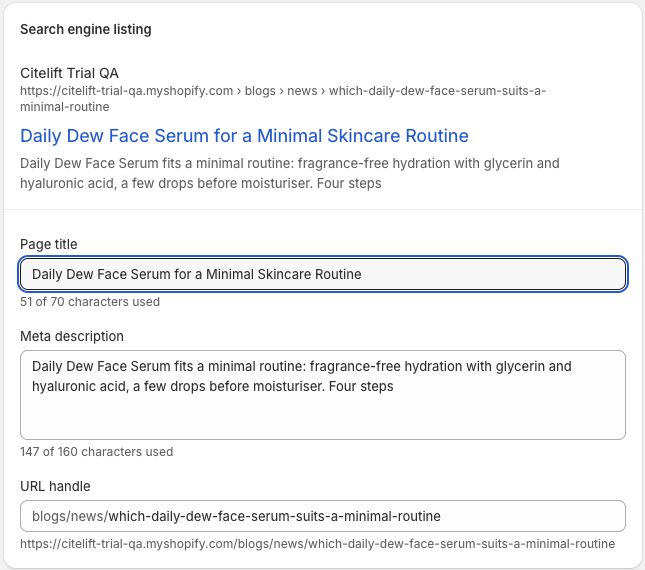
This screenshot was captured read-only on 10 September 2026 from Content → Blog posts → article → Search engine listing → Edit. The account header was cropped out. The operator expanded existing fields but changed and saved nothing; it therefore verifies the current field location and native prefix, not redirect behavior.
Test in a private window or with a command that does not reuse a cached page:
curl -sS -D - -o /dev/null -L --max-redirs 10 \
  https://store.example/blogs/field-notes/old-handle
curl -sS -D - -o /dev/null -L --max-redirs 10 \
  https://store.example/blogs/field-notes/new-handle
Here -L follows redirects, -D - prints the response headers for the source and each hop, and --max-redirs 10 stops a loop from running indefinitely. Record the first status, each Location value and the final status. A permanent move should reach the intended live page without a loop or unnecessary intermediate redirect. Shopify notes that browsers and search engines can cache 301 responses, so deleting a redirect may not immediately reverse what a previous browser shows.
The offline release validator checks that the blank redirect worksheet stays structurally valid and that the separate synthetic WordPress migration map points published sources directly to their proposed final paths. It never signs in to Shopify or changes a store. It does not prove live redirect behavior. We ran the separate owned-store check below to test that behavior.
A reversible check on our owned demo store
On 10 September 2026, we tested one temporary redirect on Citelift’s password-protected QA store. We left the existing destination article unchanged.
| Check | Observed result |
|---|---|
| Before creation | /blogs/news/content-gap-redirect-check-cdc4451 displayed the theme’s Page not found message. |
| Native admin | We created a redirect from that path to /blogs/news/which-daily-dew-face-serum-suits-a-minimal-routine. |
| After creation | The authenticated storefront browser reached the intended article; its heading matched and its canonical used the destination path without the test query string. |
| Cleanup | We deleted only the temporary redirect and verified that the redirect list was empty again. |
| Rollback check | An immediate revisit still reached the destination. A later revisit displayed Page not found again. |
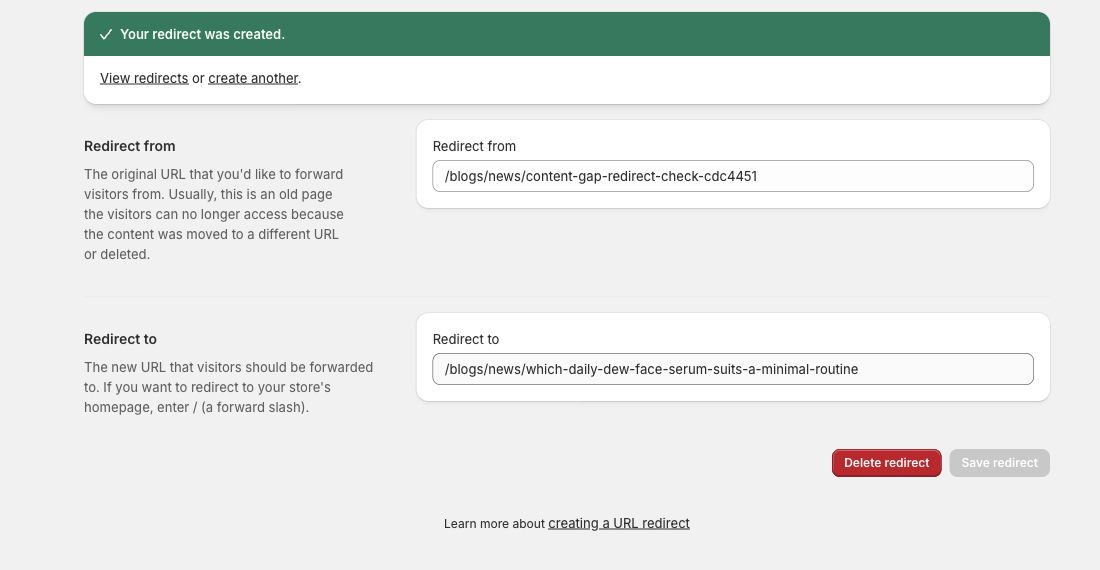
This check verifies creation, browser navigation, the destination canonical and removal. We did not capture an HTTP status trace, so it is not a measured one-hop 301 trace. Unauthenticated requests to this protected store reach the password page; the storefront observations used the owner’s authenticated preview. The delayed rollback is consistent with caching, but this single check does not establish a cache lifetime. Use the header commands above on your own accessible store to record the actual status and hops.
Check canonicals, internal links and discovery
A redirect is only one signal. Open the new page source and find the canonical link in the document head. Its href should use the final preferred URL, not the retired path, a preview domain or a different article. Shopify's theme guidance uses the global canonical_url object to render this field. Shopify SEO metadata documentation, accessed 10 September 2026.
Then update links that you control:
- blog cards, related-post modules and breadcrumb links;
- links inside old and new articles;
- navigation menus and footer links;
- product and collection copy;
- scheduled email, social and ad destinations where editing is still possible.
Link directly to the final URL. Making every click cross a redirect adds avoidable work and can hide a broken mapping. Google's current canonical guidance calls redirects and rel="canonical" strong signals, sitemap inclusion a weaker signal, and recommends linking internally to the canonical URL. Google canonical guidance, accessed 10 September 2026.
After the change, inspect the generated Shopify sitemap and a small set of representative pages. The new URL should be discoverable; the old URL should not be emitted as the current article. Search Console may continue to show the old address while systems recrawl it. That delay is not, by itself, proof the redirect failed.
If a URL is still missing, work through the Shopify indexing diagnosis before requesting another crawl.
Roll back with evidence, not by deleting blindly
Keep the redirect map, timestamp and reviewer. If the new page is broken, restore a valid destination first. If the editorial decision itself was wrong, decide which URL should become canonical, update internal links and create a direct redirect from the retired address to the restored one.
Removing a 301 is not an instant browser rollback because it can be cached. Test with a fresh client and record the result. For a wider migration, Google's site-move guidance recommends preparing a URL map, testing redirects, using self-referencing canonicals on the new pages, updating internal links and retaining redirects for as long as possible, generally at least a year. It also warns against sending many old URLs to one irrelevant destination. Google site-move guidance, updated 20 August 2026 and accessed 10 September 2026.
Use the library-level content audit to decide which pages deserve to move or merge. If the URLs come from another CMS, follow the wider WordPress-to-Shopify migration checklist. The Shopify blog SEO checklist covers the checks that remain after the redirect works, and the free draft audit reviews pasted article text without fetching a URL or calling an AI model.
Questions.
Does Shopify create a redirect when I change a blog-post handle?
Shopify's current blog-post editor preselects Create a URL redirect when you change the URL handle. Keep that option selected, save the post, and then verify the old URL in a clean browser session rather than assuming the redirect exists.
Can I remove /blogs/ from a native Shopify article URL?
Native Shopify blog and article routes use the blog structure, such as /blogs/news/article-handle. You control the blog and article handles, but this guide does not treat the /blogs/ resource path as an editable slug.
Should every deleted article redirect to the home page?
No. Redirect to a close replacement that answers the same reader need. If there is no useful replacement, a truthful not-found response can be better than sending every old URL to an irrelevant home page.
Does a 301 guarantee that rankings will remain unchanged?
No. A permanent redirect is a canonicalization signal and preserves access for old links, but search systems still need to crawl and process the change. Content, demand, internal links and other signals can also change.
Citelift is listed on the Shopify App Store: Citelift on the Shopify App Store.