Guide · updated 20 September 2026 · 8 min read
Shopify blog SEO: setup, publishing and measurement
Set up a Shopify blog, publish a useful first article and check its SEO, product links and measurement with a practical launch checklist.
Shopify includes a blog; effective blog SEO starts with a useful article and a working path to the relevant products. Set up the blog, answer one buying question, check the published page and then measure what happened. A writing app can help with the workflow, but neither an app nor a publishing quota guarantees traffic or sales.
This guide covers the first setup and the checks worth repeating. Primary documentation was checked on 17 September 2026. Download the blog launch checklist.
- Starting a blog: follow the setup steps below.
- Choosing software: compare Shopify blog apps by task and current price.
- Already published but missing from search: use the indexing diagnostic.
Set up your Shopify blog and publish a first post
Shopify's native blog supports text and images, immediate publishing and scheduled posts. You do not need another blogging app simply to publish an article. Your team still needs to supply useful content, accurate facts and review. Shopify blogging documentation.
- Open Blog posts in Shopify admin and choose the blog that will hold the article. Manage or create a blog if you need a distinct publication; do not create another one for every keyword variation.
- Add the article title and content. Select the intended blog and author, and add a relevant featured image and excerpt where the workflow calls for them.
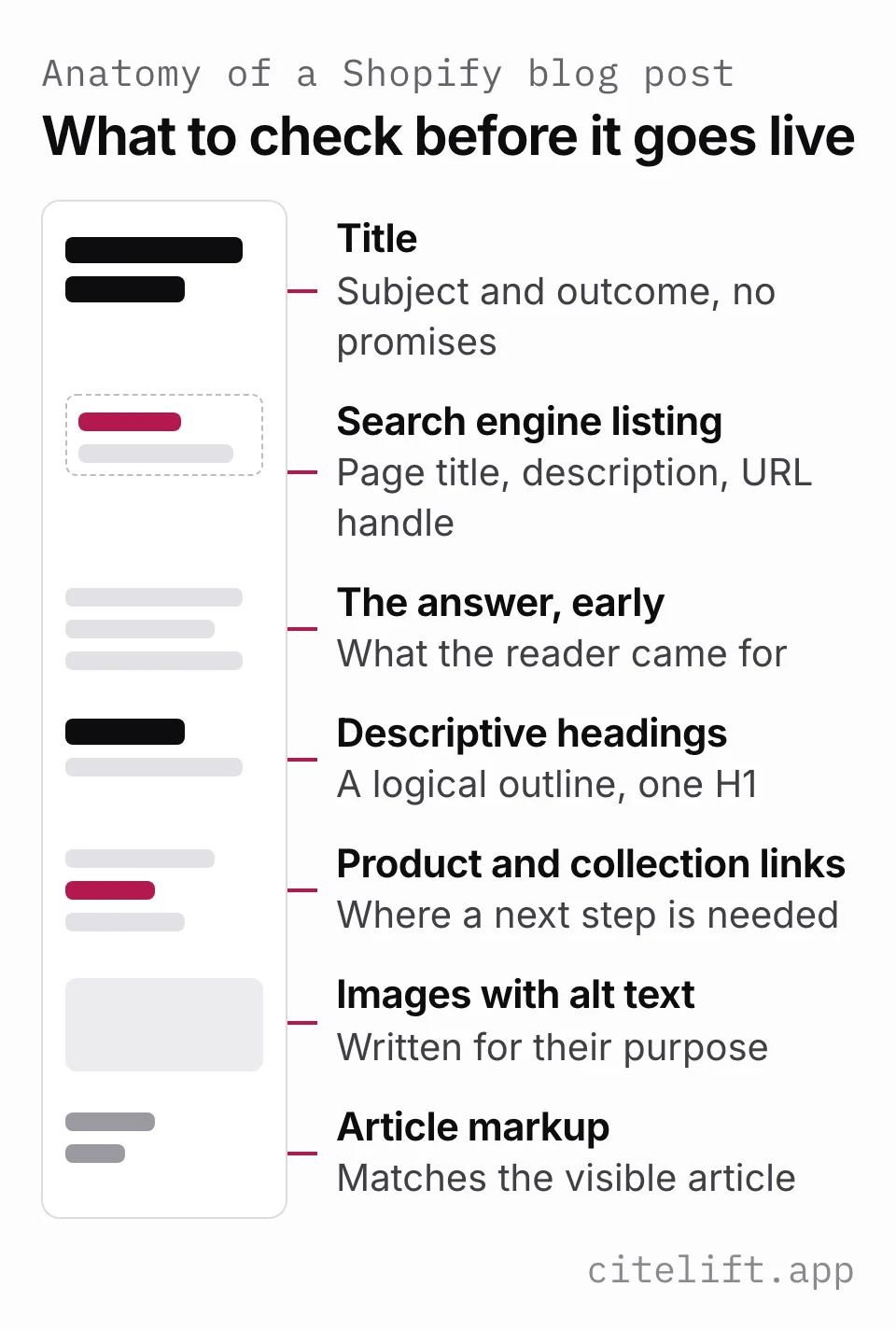
- Edit the search engine listing. Review the title, description and URL handle before the page acquires links.
- Check visibility and scheduling. Keep unfinished work hidden; confirm the intended publication time and the behavior of the system doing the scheduling.
- Make the blog reachable from an appropriate store menu. A saved post and a navigable blog are separate checks.
- Preview the article on desktop and mobile. After publishing, open its actual URL while signed out and follow its product links.
These steps summarize Shopify's blog-management and post-management documentation. The exact editor and rendering depend on your theme or blog application; inspect their output rather than assuming all tools store content the same way.
Start with the post, not the settings
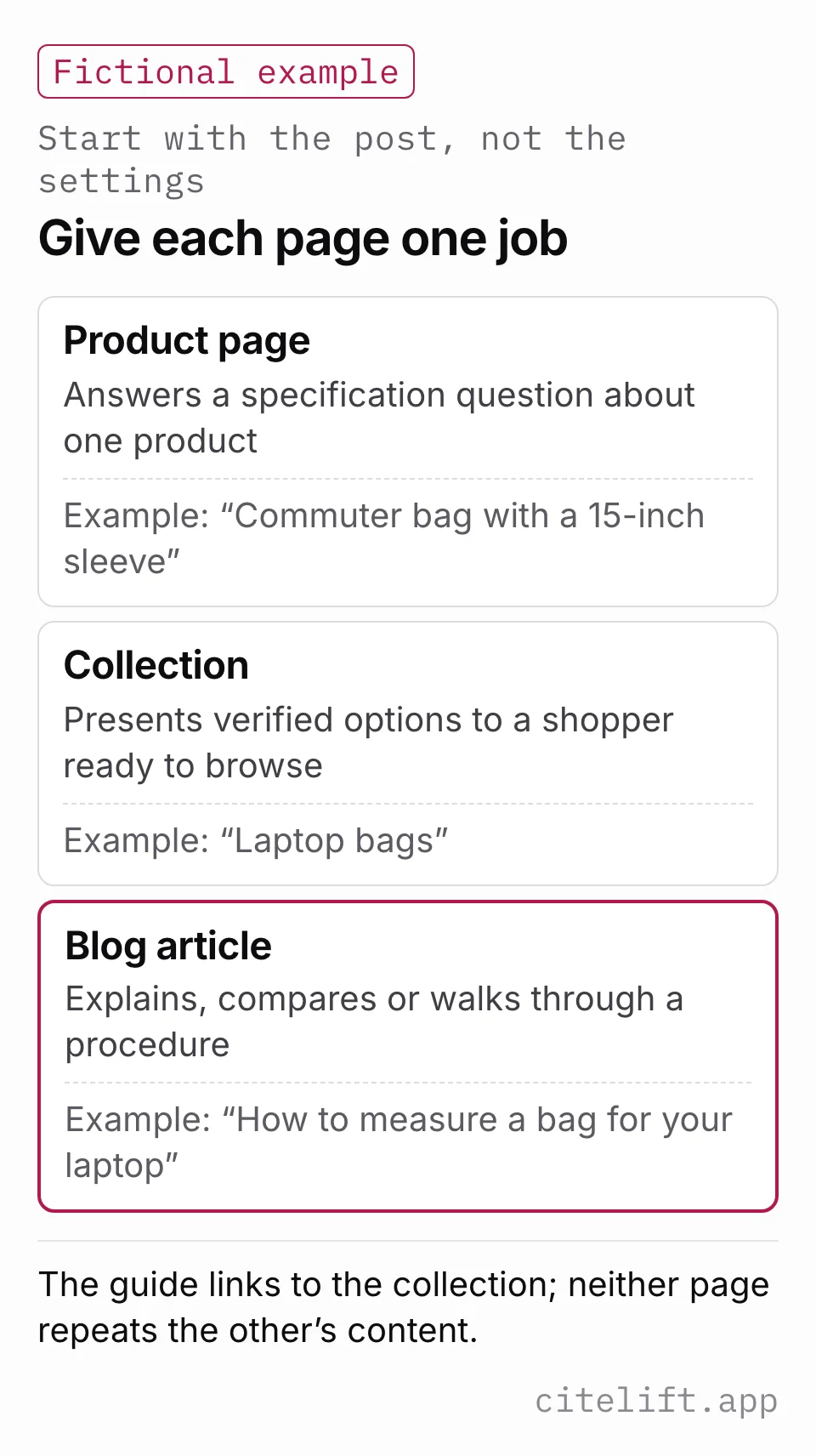
Write the question your reader needs answered and the decision the article should enable. A product page may already answer a specific specification query. A collection can serve a shopper ready to browse. A blog is useful when the buyer needs an explanation, comparison or procedure.
For example, a fictional bag store might connect a measuring guide to a collection of suitable bags. The guide explains how to record usable dimensions; the collection presents verified options. Neither page needs to repeat the other's entire content. Use the keyword-to-page map and collection-page audit to assign those jobs.
Choose topics from actual customer questions and sourced query evidence when available. A plausible phrase is a hypothesis, not measured demand. Several close keyword variants may belong to one article. The content brief records the answer, evidence and scope before drafting.
The title
State the article's subject and useful outcome. “How to measure a bag for your laptop” is more informative than “Our ultimate bag tips.” Do not promise compatibility or a performance result that the article cannot establish.
Keep the title concise, but do not treat sixty characters as a universal Google cutoff. Google generates title links from several signals and can truncate or change them depending on the result and device. Google title-link guidance.
The page's visible heading and search title can differ slightly while describing the same content. Use the title and description examples for more detailed editing decisions.
The search engine listing
Write a short description of what the reader will learn, including any important boundary. A good promise for the fictional bag guide is a measurement procedure; an unsupported promise is a guaranteed perfect fit.
Google sometimes uses a meta description for its snippet and sometimes selects page text for the query. The description you enter is not guaranteed to appear verbatim. Google snippet guidance.
Keep an established URL stable unless a change has a clear purpose. If you change a handle, check redirects and incoming links together; a URL edit need not lose all link value when the move is handled correctly. Follow the Shopify URL and redirect checklist.
Headings
Use descriptive section headings in a logical hierarchy. Let the article template supply its main heading where appropriate, then organize the body under meaningful subheadings. Inspect the rendered page before adding another H1.
There is no required number of sections in this workflow. Use enough to answer the question without splitting a small idea into empty headings. Longer articles can benefit from verified table-of-contents links; a short answer may not need an outline.
Internal links to collections and products
Place links where readers need a next step: the product being discussed, a relevant collection, a sizing procedure or an important policy. Explain the relationship in the surrounding sentence instead of appending an unrelated list of products.
The internal-linking guide shows how to connect articles, collections and products without forcing a link.
Choose the destination that preserves the intended item and market. A canonical URL and a shopper's variant-selection URL serve different purposes; do not strip a useful variant parameter blindly. Check the selected option, price and availability using the variant audit.
If you use Citelift's article-attribution tags, follow its documented tracking method. Do not add acquisition UTMs to every internal link without understanding how your analytics interprets them. A link parameter by itself does not establish that an article caused a purchase.
Images and alt text
Use images that explain the article or show verified product details. Write alternative text for meaningful images based on their purpose in the page; decorative images should not be given a fabricated keyword description.
Google's image guidance recommends relevant surrounding text, descriptive filenames and appropriate image quality. These are usability and discovery practices, not a reason to fill the page with stock images. Google image guidance.
Preview loading and layout on mobile, including captions and tables. The images and video guide covers responsive assets and accessibility in more detail.
Article markup and what your theme already emits
Inspect the structured data your theme and apps already produce. Multiple blocks can describe different entities; the problem is inaccurate, conflicting or inappropriate information, not the count alone.
Google's Article guidance covers headline, images, dates and author information. Keep those fields aligned with the visible article and update dates when the content actually changes. Markup can help describe a page but does not guarantee a search feature. Google Article guidance.
Do not add FAQ markup to pursue a retired Google feature. Google's changelog says FAQ rich results stopped appearing on May 7, 2026. Useful visible FAQs remain content for readers. The structured-data guide explains the current boundary and how to audit conflicting output.
Publishing cadence
Choose a schedule that leaves time to research, review and maintain the work. There is no demonstrated rule here that one post every week always beats a carefully prepared batch. A subscription's article allowance is capacity, not a target that must be filled.
Citelift's current monthly plans allow up to four articles weekly on Starter ($49), seven on Core ($99) and fourteen on Growth ($199). Its schedule uses the merchant's selected days and store-timezone windows. Core and Growth offer an optional review hold; automated checks can also hold work that is not ready. Check current pricing and editorial controls before choosing the workflow.
Revisit older articles when product facts, policies or sources change. The content calendar should reserve maintenance effort as well as space for new topics.
Measuring it
Separate three questions: can the page be found, does it attract the intended audience, and do readers take a useful next step? Record the publication date and later changes before interpreting a trend.
| Evidence | What to inspect | What it does not prove |
|---|---|---|
| Published URL and page output | Visibility, links, metadata and mobile usability | Google indexing |
| Search Console | Indexed state and page/query impressions and clicks | Every search query or every AI answer |
| Site analytics | Qualified visits and article-to-product actions | Incremental sales caused by the article |
| Order attribution | Orders credited under a defined window and rule | A controlled causal effect |
| AI-answer observations | Exact question, surface, date and cited URL | All users' answers or future citations |
Use comparable periods and filters. New or low-volume pages may not have enough observations to support a conclusion. A vendor's estimated search volume is also different from the number of visits your page receives. The Search Console guide and GA4 guide explain those measurement boundaries.
For AI checks, retain successful answers separately from failed or blocked requests. The manual checker analyzes an answer you supply; it does not query an AI service. A missing observation must remain unknown rather than becoming “no mention.”
What has changed for 2026, and what has not
Search and AI systems can use product, collection, support and article pages. A blog does not automatically become a preferred source because it is long or starts with a short answer. Make the explanation useful and its material claims checkable.
Google's current AI guidance says ordinary SEO practices remain relevant and no special schema or additional AI file is required for its AI features. Eligibility is not guaranteed selection. Google AI guidance.
Review access decisions per crawler and service using the AI crawler guide. Keep discovery configuration, observed citations and commercial outcomes separate when reporting progress.
A short pre-publish pass
Read the opening answer, inspect the heading outline and verify the facts behind product claims. Follow each important product link, check the selected variant and test the page on mobile. Confirm metadata, visible authorship, dates and publication settings. For comparisons, use the claim ledger; for FAQs, use the customer-question routing guide.
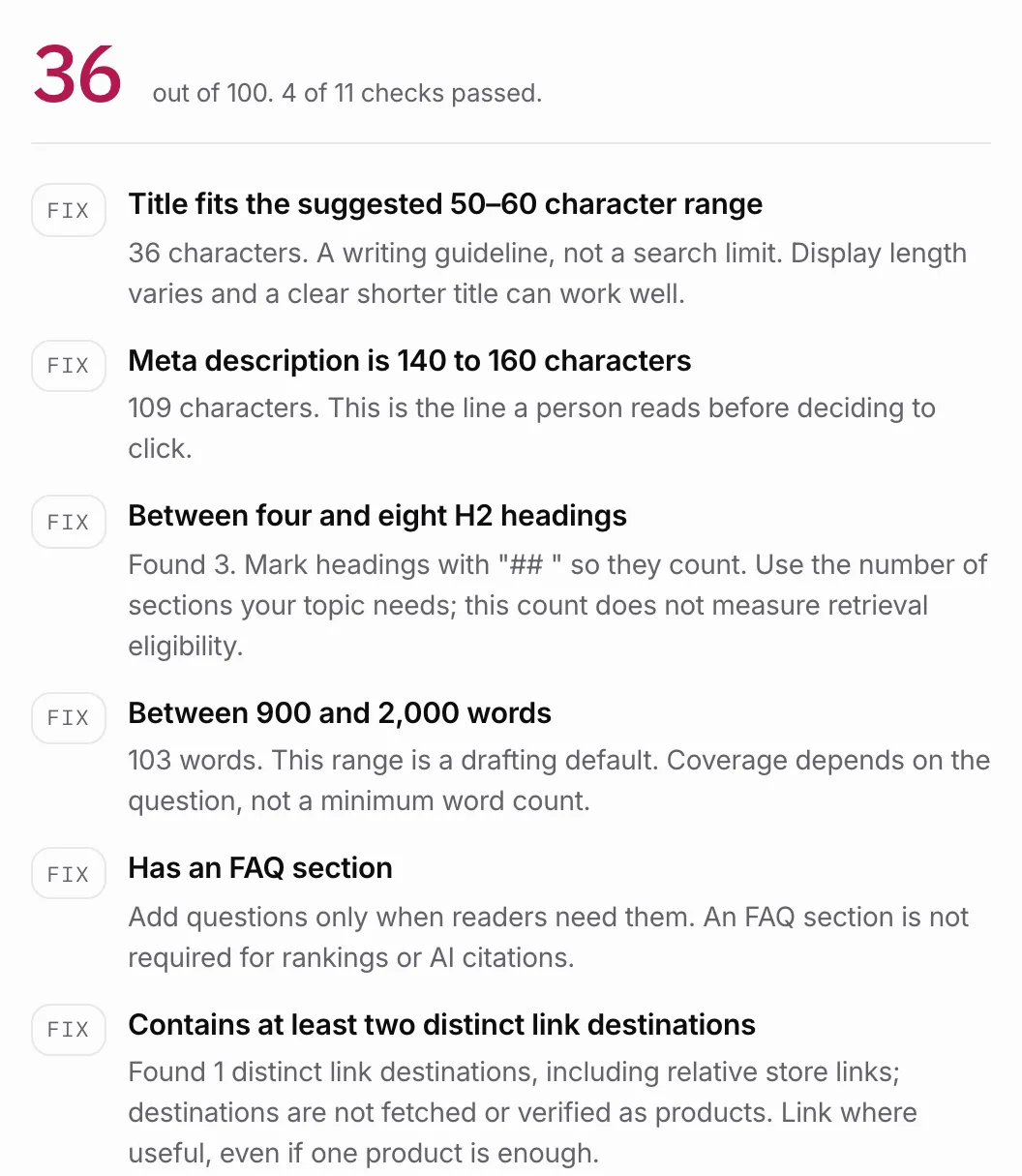
Then run the free draft audit for structural checks. It does not fetch the live URL, verify claims or predict rankings. Finish by opening the actual published page and recording the result in the launch checklist.
Questions.
Where do I set the SEO title and description for a Shopify blog post?
In the blog post editor, edit the search engine listing title and description. Write an accurate summary; Google can choose different title text or a snippet for a particular query.
How often should I publish?
At a cadence you can hold without dropping quality. Citelift's current ceilings are four articles weekly on Starter, seven on Core and fourteen on Growth, scheduled on selected days and write/publish windows in the store timezone. A ceiling is not a quality target.
Do I need to add Article structured data myself?
Check what your theme already emits before adding anything. Many themes output Article or BlogPosting markup on the article template. Multiple blocks are not automatically invalid; identify their purpose and correct contradictory or inaccurate descriptions.
Does blogging still matter now that assistants answer questions directly?
A blog is useful when a buyer needs an explanation beyond a product or collection page. Search and AI systems can use different page types; publishing a post does not guarantee retrieval or citation.
Should I block AI crawlers from my blog?
Decide per vendor and agent. Search-crawler access supports eligibility through that vendor's search path; user-directed fetchers can follow different rules. Access does not guarantee retrieval or a citation.
Citelift is listed on the Shopify App Store: Citelift on the Shopify App Store.