Guide · updated 18 September 2026 · 12 min read
Automate a Shopify blog with editorial control
A documented Shopify workflow from catalog selection through fact review, preview, approval, scheduling, review hold and post-publication correction.
Blog automation is useful when it moves repeatable work—catalog selection, briefing, link checks, scheduling and measurement—without hiding the decisions a merchant still owns. A safe workflow makes the evidence visible, stops on unresolved failures and preserves the draft. It does not treat the ability to generate text as permission to publish it.
This is a documentation walkthrough, not a hands-on merchant case study. The product-control contracts were rerun locally on 18 September 2026; the current UI image remains a read-only 14 September capture from an owned fictional QA store. No new article was generated, approved or published for this guide. The fictional example, Alder & Row Home, is not a customer and every product fact is invented to explain the controls.
Download the editorial control checklist and adapt the owner, evidence and stop condition columns to your own process.
The control loop at a glance
The workflow has seven gates:
| Stage | Automation can prepare | A person or verified rule must decide | Evidence to retain |
|---|---|---|---|
| 1. Catalog | Candidate products and current fields | Which products belong in scope | Product ID, variant, source URL, fetched date |
| 2. Brief | Buyer question, outline and proposed sources | Whether the question helps a real buyer | Approved brief and excluded claims |
| 3. Draft | Prose, links and media plan | Whether reasoning and tone are fit to publish | Draft version and source map |
| 4. Fact review | Field-by-field comparisons and URL checks | Ambiguity, conflicting sources and regulated claims | Gate result with exact failure reason |
| 5. Preview | Rendered article and metadata | Layout, context and product placement | Preview timestamp and reviewer decision |
| 6. Publish | Queueing in a chosen window | Approval or automatic eligibility | Scheduled time, store timezone and Shopify result |
| 7. Correct | Change detection and a proposed repair | Whether a live page should change | Before/after text, reason, reviewer and date |
The key property is reversibility before publication and traceability after it. A failed gate should leave a readable draft, not a blank screen or an endless regeneration loop.
1. Select products from a current catalog
The fictional Alder & Row Home catalog contains a carbon-steel skillet, a tri-ply stainless pan and a linen apron. The proposed buyer question is “Is carbon steel or stainless easier for everyday cooking?” The apron is excluded because it does not answer the decision.
For each included product, freeze the facts the article will use:
- stable product and variant identifiers
- canonical product URL and availability
- title, description and selected-variant price
- materials or ingredients
- dimensions, size or quantity
- use, care and safety language
- image source and alternative text
- collection date and the field or page each fact came from
Do not let the model choose a nearby product merely because the intended one is unavailable. Out-of-stock handling is an editorial rule: keep the article useful without a purchase link, replace the product only when another catalog item truly fits the same reasoning, or reschedule the topic. The expanded product-linked article guide shows those options in context.
Citelift learns from the connected Shopify catalog after plan approval. Product names and claims must come from catalog data, verified sources or merchant answers. A real one-product catalog remains valid; the system should narrow the article rather than invent a second option.
2. Approve a brief before generating prose
The brief is the cheapest place to stop a bad article. It should name one buyer question, the products that belong, the proposed answer, the sources and the claims that are prohibited.
For the fictional pan comparison, the brief says:
- Question: Is carbon steel or stainless tri-ply easier for everyday cooking?
- Answer boundary: Compare care, acidic-food use, weight and the documented oven limit. Do not claim one material is healthier or universally safer.
- Products: No. 10 Carbon Steel Skillet and Alder Tri-Ply Fry Pan.
- Required links: Each product's canonical URL, the store's care guide and an external primary source only where the explanation needs one.
- Exclusions: No invented heat-response test, durability lifespan or customer preference statistic.
In Citelift's approval-first onboarding, the merchant connects Shopify, chooses a paid plan and approves it in Shopify before merchant AI generation begins. The merchant then reviews the brand brief, content plan and first article. The first article stays a draft until setup finishes. That sequence keeps billing approval, editorial approval and remote publication as separate events.
For a multi-person team, verify the permissions behind that handoff. Shopify's current Blog posts and pages permission lets a user view, create, change, publish and delete blog posts and pages. Our workflow conclusion is that granting this permission alone does not enforce separate writer and publisher roles. Confirm who can publish and whether review is actually enforced before relying on the handoff.
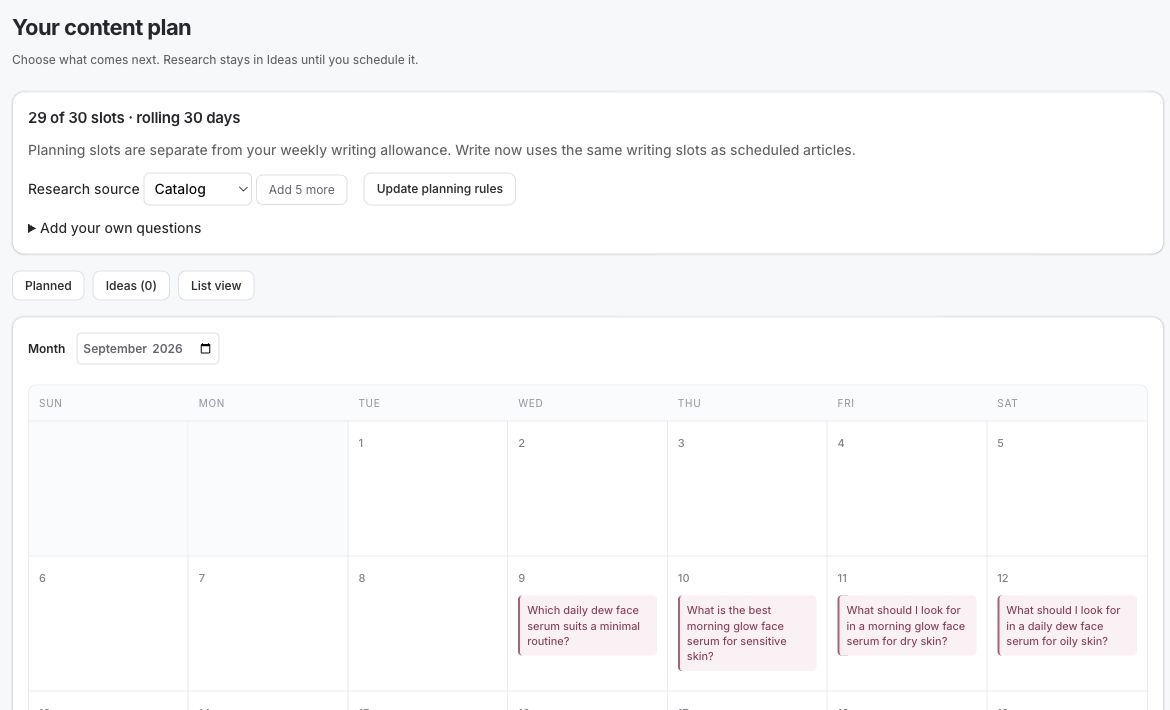
Citelift’s owned QA store, 10 September 2026. Test catalog and planned questions; this is a product walkthrough, not merchant outcome evidence. The read-only check showed Planned and Ideas views, calendar and list views, a catalog research source, “Add your own questions” and planning-rule controls. The 30-day planning slots shown are separate from the weekly writing allowance; no article was generated or scheduled during this check.
3. Draft from facts and attach sources to claims
The writer can now turn the approved brief into prose, but the facts should remain addressable. A product claim needs a catalog field or merchant source; a factual explanation that goes beyond the catalog needs a reachable supporting source. A citation is not decoration. Open it and verify that the nearby sentence is actually supported.
For the sample comparison, product placement follows the reasoning:
- Link the stainless pan in the section about acidic sauces because its documented material is relevant there.
- Link the carbon-steel skillet in the care section beside the store's drying and seasoning directions.
- Mention both in the weight table using the selected variants' verified values.
- Do not place the apron in a “you may also like” block inside the article body; it does not help answer the question.
The article renderer can prepare headings, product cards, images and other components, but a polished layout does not validate a sentence. Read the visible article, not only the source fields.
4. Run bounded quality checks
Citelift currently checks claims, product truth, citations, duplication, structure, readability, images, links and media. The exact gate result matters more than a single blended score. “Product link failed because the item is unavailable” tells an editor what to do; “82/100” does not.
A repairable failure can receive a bounded automatic correction. Current Citelift behavior permits up to two corrective passes for exact text patches, replacement sources or missing-video research, with the full gates rerun after an accepted automatic change. Duplicate topics and catalog permission failures remain held for a person because another rewrite cannot decide them. Verified media is reused rather than regenerated casually.
The owned QA article inspected read-only on 10 September showed a historical check snapshot from its last generated draft, including a Claims failure for “Treating” while other displayed checks passed. Those saved results do not certify later manual edits: saving an edit does not rerun the generation checks. Publishing a held saved draft records a manual approval. An editor therefore needs to recheck the changed passage and its affected facts before choosing that action. This is product-behavior evidence from a fictional QA article, not a merchant outcome or a new approval test.
Review hold is available on Core and Growth. Starter does not include review hold, so an article that passes every required quality gate can proceed in its selected publishing window. No plan should publish an article with an unresolved required gate. For the broader editorial reasoning behind these checks, see keeping AI-written product content true.
5. Preview the page a buyer will see
Review the rendered article at mobile and desktop widths. The preview should show the visible title, byline, dates, headings, product placements, external citations, hero image and relevant video or safe media state. Check the destination of each product link and confirm that the displayed price or availability has not drifted.
Use a short decision record:
- Approve: The evidence supports the draft and the rendered page is ready.
- Edit: A precise passage, source or placement needs a change. Save the reason with the revision.
- Regenerate: The brief is sound but the draft is unusable. This is a new version, not proof the original problem disappeared.
- Skip: The topic no longer belongs in the plan. Keep enough history to stop it from being proposed again immediately.
The free blog SEO audit can inspect a title, meta description and body you paste for eleven structure heuristics. It does not fetch a URL, verify facts, predict rankings or run Citelift's paid quality gates. Use it as one readable pre-publish pass, not as approval.
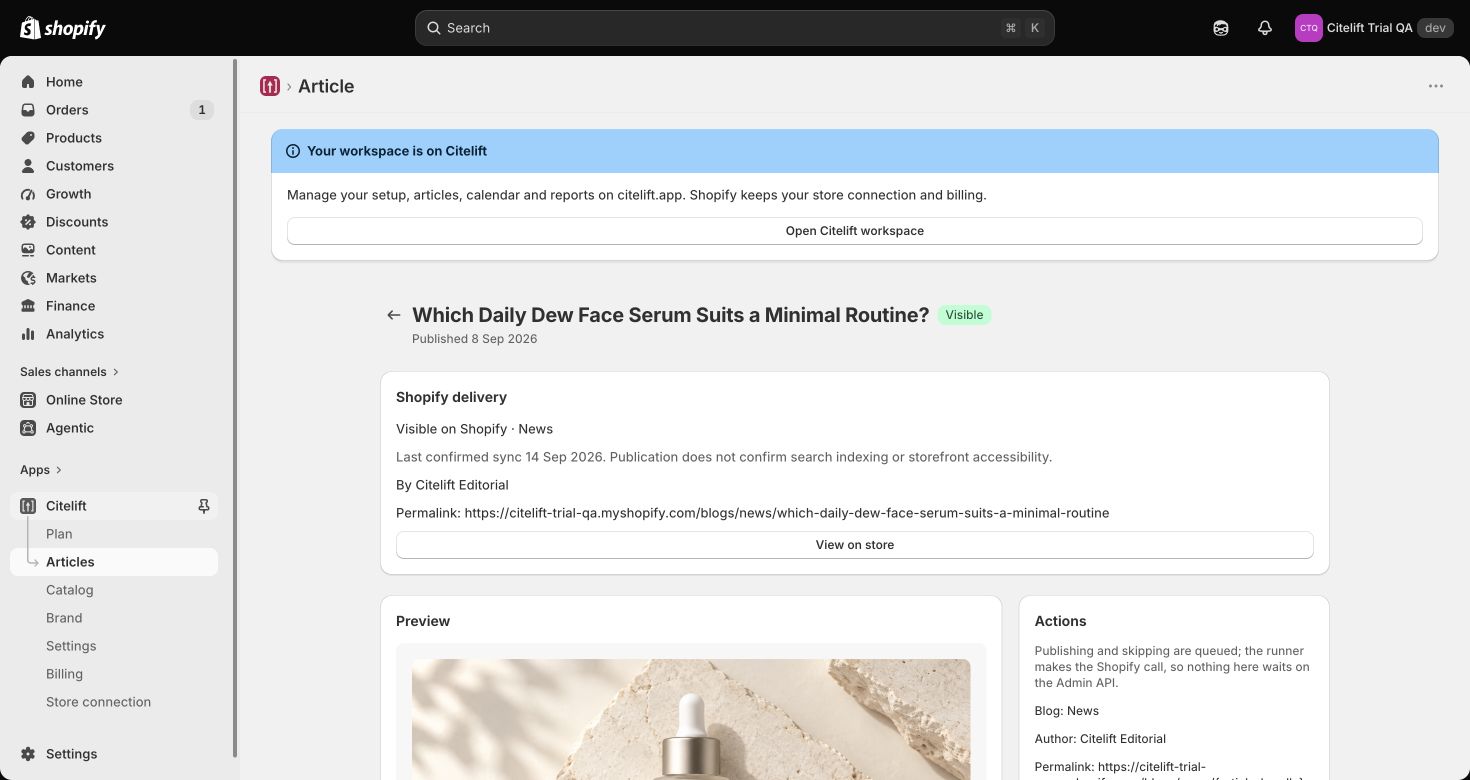
Citelift’s owned QA store, captured read-only on 14 September 2026. This fictional QA article was published on 8 September; the screenshot is a product walkthrough, not merchant outcome evidence. The screenshot distinguishes Shopify-confirmed visibility from search indexing and storefront accessibility. In the same read-only inspection, lower-page controls for publish-saved-changes, regenerate, skip and edit-in-Shopify were present. No generation, approval or publication action was performed during capture.
6. Schedule in the merchant's timezone
Shopify itself supports future publication: in the blog post editor, the merchant can choose a date and time under Visibility (Shopify Help Center, Advanced publishing, accessed 10 September 2026). Automation adds repeatable planning and guardrails around that native ability.
Citelift schedules by the merchant's selected days and selected write/publish windows in the store timezone. The current ceilings are:
| Plan | Monthly price | Article ceiling | AI-visibility check | Review hold |
|---|---|---|---|---|
| Starter | $49 | 4 per week | Monthly | No |
| Core | $99 | 7 per week | Weekly | Yes |
| Growth | $199 | 14 per week | Weekly | Yes |
These are ceilings, not an instruction to fill every slot. A merchant can sustain a lower cadence. Selected windows should be displayed with the actual timezone, especially around daylight-saving changes. Avoid documenting one fixed clock time as if it applied to every merchant.
Publication state should follow Shopify's remote visibility. A queued job is not yet a visible post, and a local success message is not proof that Shopify accepted the write. Keep the Shopify article identifier, URL and response state, and make retries idempotent so the same job cannot create duplicate posts.
7. Correct a published article without erasing history
Publication starts maintenance. Product availability, formulas, care instructions, price and sources can change. A safe correction process detects the drift, proposes a bounded edit and records what changed.
Suppose the fictional No. 10 skillet becomes temporarily unavailable after the comparison is published. Three options are honest:
- Keep the comparison and change the product callout to “currently unavailable,” if the educational section still helps.
- Remove the purchase callout but retain the material comparison and care instructions.
- Replace the product only if another catalog item fits the same criteria, then recheck every sentence tied to the old item.
Do not silently swap the link while leaving the old weight, dimensions or care directions in place. Protect merchant edits by comparing the current published body with the last saved canonical version before overwriting it. Citelift preserves published article HTML until an explicitly authorized update; automation should not rewrite a merchant's live edits simply because the scheduler ran.
What the Shopify merchant sees today
The article screenshot above is a read-only capture from the owned QA store on 14 September 2026. It shows the visible delivery state, permalink and “View on store.” Lower on the same page, the read-only inspection found publish-saved-changes, regenerate, skip and edit-in-Shopify controls. We did not exercise any of those actions. On 18 September, a fresh local six-file run passed 140/140 tests covering the deterministic scorer, product-truth gate, exact repair, hold decision and article route. Download the public claim-by-claim proof map for the test or screenshot behind each claim, its reproduction path and its limit.
- Hold shows why the draft stopped. The article remains held until the required problem is resolved or the reviewer makes an allowed decision. Silence does not count as approval when the store uses an approval hold.
- Approve or skip records one choice. Approve sends the reviewed revision toward publication; skip leaves tomorrow's article unaffected. Repeating or contradicting the choice does not create a second action.
- Queued and visible are different states. The button confirms that publication is queued. The article becomes visible only after Shopify reports it that way. The screen then shows the permalink and “View on store.” Visibility still does not prove search indexing or that every storefront visitor can reach the page.
- A Shopify edit pauses replacement. When the copy in Shopify differs from Citelift's saved version, the current article screen says the local version is preserved and nothing publishes while the two disagree. The merchant can read the Shopify version before deciding which copy should continue.
Shopify article ownership after cancellation or uninstall
After a subscription is cancelled, articles Citelift has already published remain blog content on the merchant's store; the support page explains cancellation and retained published articles. The app-uninstall path likewise does not delete those remote articles, but it does remove Citelift's stored Shopify access token and sessions, clear queued work and start the 30-day deletion clock for Citelift's local shop data. Cancellation also stops Citelift's scheduled work. This persistence applies only to articles already created in Shopify: drafts and queued jobs do not keep running, and no future Citelift publication continues without active access and an eligible plan. The merchant can continue to manage or delete the retained articles in Shopify.
Separate WordPress ownership evidence
The 0.1.0-beta.5 WordPress connector has its own editor-conflict proof: a human edit remained intact when an older Citelift update arrived. The lifecycle fixture in that same runtime record showed that uninstall left published posts and media in WordPress while removing the connection and operational data. Those records support the WordPress workflow only; this update did not retest Shopify uninstall behavior. The downloadable proof map links the detailed runtime records.
The Shopify hold/approve checks and WordPress records use synthetic or local runtime fixtures. They demonstrate the named product controls within their tested paths, not merchant adoption, time saved, a customer outcome or an aggregate article-quality rate. The screenshot establishes a dated UI state only. The worked app worksheet shows how to use the controls in a buyer evaluation, the product-fact example shows why a deterministic writing score cannot replace the fact decision, and Citelift proof and progress lists the remaining evidence gaps.
What to monitor after publication
Keep the evidence types separate:
- Search: impressions, queries and clicks in Search Console. These do not prove sales.
- AI visibility: dated answers to fixed buyer questions, recording mentions and source URLs separately. The free manual checker prepares questions and analyzes an answer you paste in the browser; it does not call an AI service or fetch the cited pages.
- Article traffic: page loads under a stated measurement method. A load is not a unique visitor or an attributed order.
- Orders: orders matched to the article under a stated window and identifier rule. Attribution is not causal lift.
Paid Citelift visibility checks run monthly on Starter and weekly on Core and Growth. API-based observations can differ from consumer chat interfaces, so retain the platform, question, date and answer rather than turning a single run into a universal ranking.
The minimum editorial policy
Write the following rules before switching on a schedule:
- Every product fact has a current source and selected variant.
- Every external claim has a reachable source that supports the nearby sentence.
- Every required check has a named pass, fail or not-run state.
- A repair attempt has a cap; unresolved failures stop publication.
- A person owns ambiguous claims, conflicts and live-page corrections.
- Shopify's remote state determines whether a post is published.
- Each correction retains the previous text, reason, reviewer and date.
That policy is editorial control. The automation is the machinery that applies it consistently.
Questions.
Can Shopify schedule a blog post without an app?
Yes. Shopify lets a merchant choose a future date and time in a blog post's Visibility settings. An app is useful when planning, drafting, checking and scheduling need to run as one recurring workflow.
Does automation remove the need for editorial review?
No. Automation can compare a draft with catalog fields, URLs and structural rules, but a person still owns ambiguous claims, conflicting sources, product suitability and intentional changes to published content.
What should happen when a quality check fails?
Keep the safe draft, show the failing check and try only a bounded correction when the failure is repairable. Unresolved or judgment-based failures should stop publication and wait for a person.
Is this a hands-on merchant case study?
No. It is a documentation walkthrough with dated synthetic contracts and an owned fictional QA screenshot. No merchant article was generated or published for this guide.
Which Citelift plans include review hold?
Core and Growth include review hold. Starter articles can publish after the quality gates pass, so Starter merchants should keep their catalog, preferences and selected publishing windows current.
Citelift is listed on the Shopify App Store: Citelift on the Shopify App Store.