Guide · updated 10 September 2026 · 7 min read
Shopify Blog Content Calendar: A Practical Planning Template
Build a Shopify editorial calendar that connects buyer questions, briefs, review, product links, publishing dates and content updates.
A Shopify blog content calendar should show more than titles and dates. It should connect each buyer question to an assigned URL, a fact-checked brief, the products and collections it will link, the person who reviews it, the publication window and the date when its claims need checking again. That makes the calendar a small production system instead of a list of hopes.
Download the blank Shopify content calendar. The four-week example below uses a fictional store, fictional products and placeholder URLs. It shows sequence and ownership, not results.
Set the operating constraints first
Before assigning topics, write down four constraints at the top of the calendar:
- how many articles the team can fact-check in a week;
- which days an editor can review drafts;
- which launches, seasonal deadlines or inventory changes are fixed; and
- who has authority to approve product and regulated claims.
Use the smallest of those limits as the working cadence. A writing tool may produce drafts faster than the catalog owner can verify them. The reviewer, source availability and stock position are part of capacity too.
Shopify lets a merchant publish a blog post immediately or schedule it, and its future-publishing guidance says to verify the store's configured time zone so scheduled content appears at the intended local time (Shopify Help Center, Writing blog posts and Future publishing, accessed 10 September 2026). Put the actual time zone and publish time in the calendar rather than writing “Tuesday morning.”
If Citelift runs the programme, its current monthly plans are Starter at $49 with a ceiling of four articles per rolling week, Core at $99 with seven and Growth at $199 with fourteen. Core and Growth include review hold; Starter does not. These are ceilings, not guaranteed output or instructions to fill every slot. Article checks, missing facts and review decisions can hold a draft.
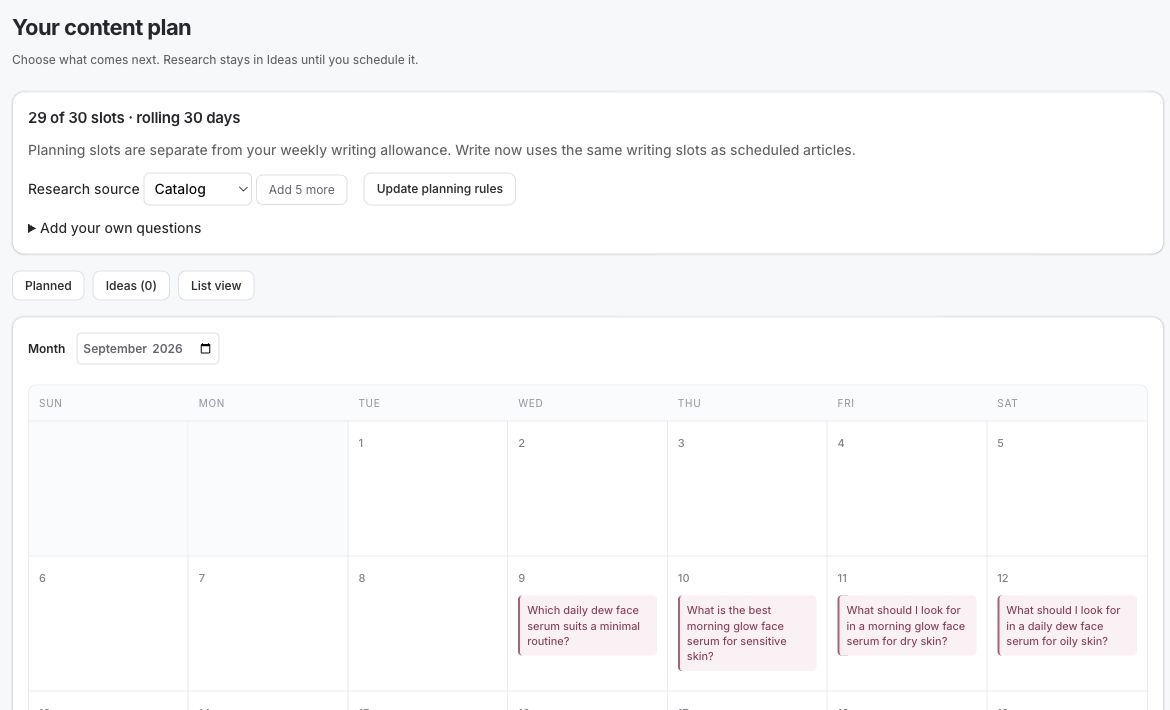
This Citelift demo-store calendar was captured in an actual browser QA walkthrough on 10 September 2026. It shows 29 of 30 planning slots, Planned and Ideas states, and the calendar's planning rules. The planning-slot count is separate from the weekly article allowance: a slot can be an idea or future plan and is not evidence that an article was generated or published. This is product-interface evidence from a demo store, not a customer result.
Plan a sequence, not a pile of titles
Start with one category and arrange questions in the order that helps a reader and the store:
- A pillar or buying guide explains the full decision.
- Supporting guides answer the difficult sub-questions.
- A comparison makes an important tradeoff explicit.
- A care or use guide helps after purchase and can reduce repeat support questions.
- An update slot revisits the strongest existing page instead of adding another URL.
That sequence creates natural internal links. The buying guide points to detailed explainers; the explainers return to the guide and relevant products. The intent-to-page keyword method prevents the calendar from assigning the same question to a product page, collection and article at once.
Do not alternate unrelated categories merely to make the grid look balanced. A short run of connected articles is easier to review, link and learn from than one isolated article in each of six categories.
A four-week fictional calendar
Imagine Ember & Reed Coffee, a fictional Shopify store preparing content around invented grinders and pour-over equipment. Its editor can approve two substantial pieces each week. Dates are illustrative.
| Publish date | Buyer question and page job | Links planned | Production checkpoints | Status |
|---|---|---|---|---|
| 15 Sep | How to choose a pour-over grinder — buying guide | Hand Grinders collection; Northline and Field products | Brief 10 Sep; fact review 12 Sep; final review 14 Sep | Scheduled |
| 18 Sep | Burr vs blade grinder — mechanism comparison | Grinder guide; Hand Grinders collection | Brief 11 Sep; product-language review 15 Sep | Fact review |
| 22 Sep | Pour-over grind size — use guide | Clearcone set; grinder guide | Brief 16 Sep; source review 18 Sep | Brief ready |
| 25 Sep | How to clean a hand grinder — care guide | Northline and Field products | Brief 17 Sep; support review 22 Sep | Proposed |
| 29 Sep | Manual or electric grinder — workflow comparison | Grinder guide; both collections | Brief 22 Sep; catalog review 25 Sep | Proposed |
| 2 Oct | Update the Hand Grinders collection introduction | New buying and care guides | Query review 28 Sep; merchandising review 30 Sep | Update due |
| 6 Oct | Pour-over setup for a small kitchen — use-case guide | Clearcone set; Northline product | Brief 29 Sep; inventory check 2 Oct | Proposed |
| 9 Oct | Review the first four URLs and choose the next question | No new URL | Search, click and support-question review | Measurement |
The calendar deliberately includes an existing collection update and a measurement day. Publishing eight new posts would look busier, but it would leave no time to improve the paths readers actually use.
Give every row enough information to move
A row is ready for production only when it contains:
- the buyer's exact question and intent;
- the assigned URL and page type;
- a link to the approved Shopify content brief;
- the collection and product pages the article may mention;
- at least one incoming and one outgoing internal link;
- brief, draft, fact-review and final-review due dates;
- the publication date, time and store time zone;
- one accountable owner at each decision point; and
- an update trigger or review date.
“Editor” is not an owner if three people can assume it means someone else. Use a name or team role with an agreed queue. Likewise, “product links” is not a linking plan. Record the actual page handles before drafting so the writer does not invent a product or select an obsolete variant URL.
The content brief should carry the facts and evidence; the calendar should link to it rather than duplicate it. When a formulation, material, price or availability claim changes, update the brief and affected pages from one traceable source. The editorial-control guide explains how to turn those owners and stop conditions into an automation workflow.
Use statuses that expose decisions
Avoid a single “in progress” label. It hides whether the writer is late, the source is missing or the merchant must decide. Use these statuses consistently:
| Status | Meaning | Next action |
|---|---|---|
| Proposed | Question has a page assignment but no approved brief | Research facts and sources |
| Brief ready | Scope, facts, links and approval owner are complete | Draft |
| Drafting | A writer owns the draft | Finish by draft due date |
| Fact review | Draft exists; catalog and outside claims are being checked | Correct or approve |
| Scheduled | Final version and Shopify visibility date are set | Verify after publication |
| Published | Live URL checked | Add links and measurement date |
| Update due | Facts, intent or performance need review | Refresh the existing URL |
| Held | A named issue requires a decision | Resolve; never auto-publish |
| Cancelled | Topic no longer deserves a page | Record why and preserve research |
Citelift uses review hold from Core upward. A held article should stay visibly held in the calendar with its failed check or missing approval, instead of being dragged to a later date until everyone forgets why it stopped.
Protect review time around launches
Work backward from a real deadline. A launch article scheduled for Friday cannot have its first product review on Thursday night if the material claim comes from a supplier document that marketing does not have.
For a normal article, reserve separate points for:
- brief approval;
- first draft;
- product and claim review;
- editorial review;
- Shopify scheduling; and
- live-page verification.
Move the publication date when a required fact is unavailable. Do not replace the missing fact with a plausible sentence. Shopify warns that generated blog text can include benefits a merchant did not provide and places responsibility for published accuracy on the merchant (Shopify Help Center, Automatically generating blog posts, accessed 10 September 2026). The calendar should make time for that responsibility.
Add links before and after publication
Internal linking has two moments. In the brief, name the collections, products and supporting articles the new page will link to. After publication, add links from existing pages into the new article. Without the second pass, the new URL may sit in the blog archive with no contextual path into it.
Use anchor text that describes the destination: “choose a pour-over grinder” is clearer than “read more.” Shopify's own site-structure guidance recommends descriptive link text for internal links (Shopify Help Center, Optimizing your site structure, accessed 10 September 2026). The product-linked article guide shows where product links belong inside the explanation.
Reserve maintenance and measurement slots
Every fourth or fifth calendar slot can be an update, consolidation or measurement task. Check:
- whether the assigned page appears for the intended queries;
- whether another store URL now competes for the same question;
- whether linked products are still available and factually described;
- whether cited sources still support the sentence beside them;
- whether readers click into the linked collection or product; and
- whether the question still appears in support or on-site search.
For commercial measurement, connect article links to the method in which blog post sold something. Attribution is evidence that an order followed a tracked path; it does not prove the article caused an incremental sale.
For a draft-level check, paste the body into the free blog SEO audit. It uses deterministic writing rules, makes no network fetch and does not verify sources, product facts, rankings or AI citations. Treat its flags as review prompts, then complete the catalog and source checks yourself.
Questions.
How far ahead should a Shopify blog calendar run?
Keep four to eight weeks assigned in detail and a looser backlog beyond that. This is long enough to coordinate facts and review without pretending that launches, inventory and buyer questions will never change.
How often should a Shopify store publish blog posts?
Choose the fastest cadence your team can research, review and maintain. A ceiling in a software plan is not a promise that every slot should be filled; a held or cancelled article is better than an inaccurate one.
Should product launches take every calendar slot?
No. Mix durable buyer education with launch-specific pages, comparisons, care instructions and updates to proven articles. Launch posts expire quickly unless they also answer a lasting question.
What status columns should a content calendar include?
At minimum use proposed, brief ready, drafting, fact review, scheduled, published, update due, held and cancelled. Make held different from late so the owner knows a decision is required.
Citelift is listed on the Shopify App Store: Citelift on the Shopify App Store.