Guide · updated 17 September 2026 · 10 min read
AI crawlers and robots.txt on Shopify
Current AI crawler roles, a Google-Extended decision example and a Shopify robots.txt.liquid pattern that preserves the platform's default rules.
The short answer
Shopify generates a working robots.txt for every store, and you almost certainly should not replace it. If you want to change it, add a robots.txt.liquid template and preserve Shopify's default Liquid groups before appending a narrow rule. AI-related tokens can govern training, search, grounding or user-triggered fetches, and one token can cover more than one use. Read the vendor's current description before deciding.
The three jobs an AI agent can have
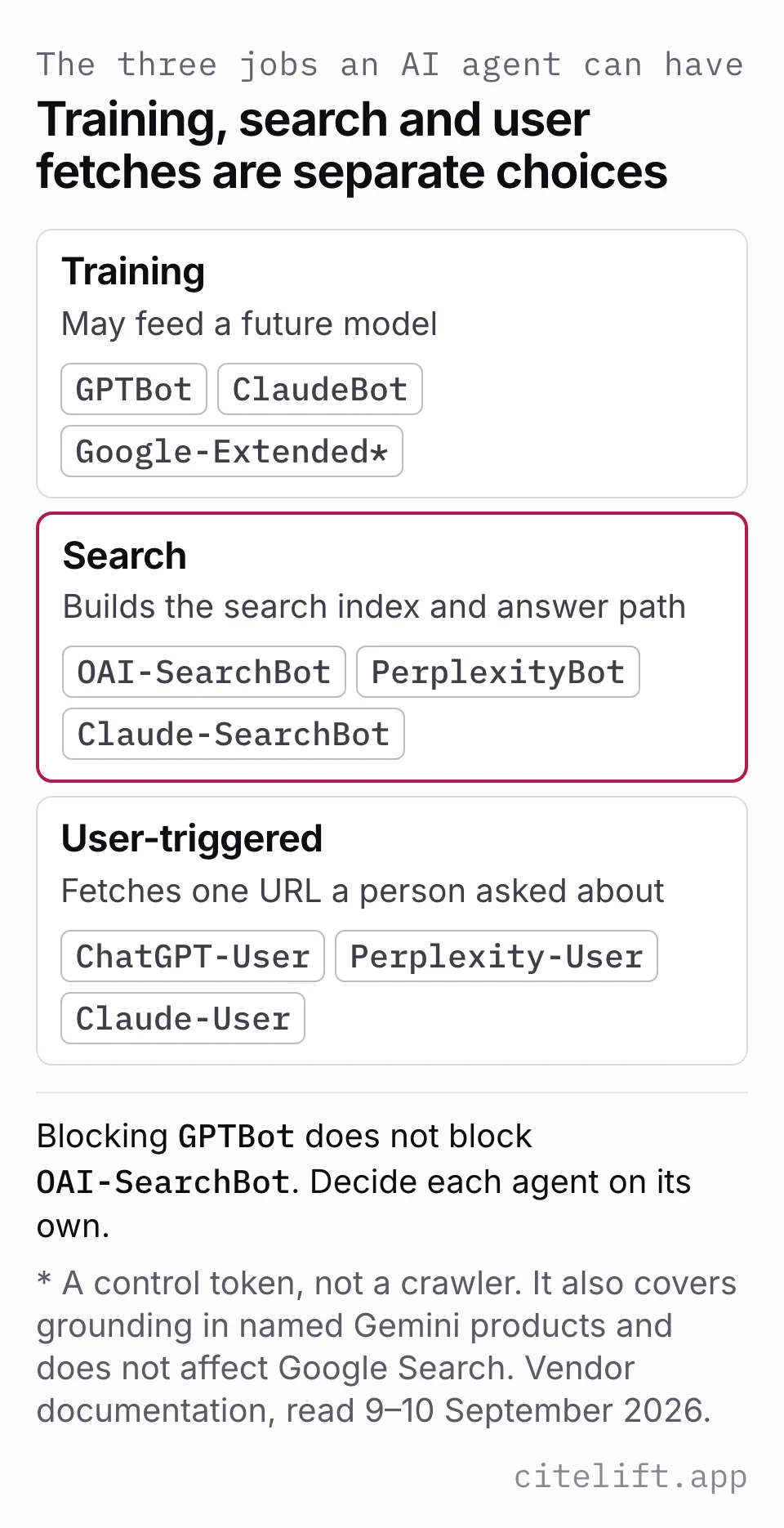
Every user agent below fits one of three buckets, and every vendor names its own bots by bucket.
Training crawlers collect pages that may feed a future model. Vendors can expose a separate search agent, but do not assume every training control has no retrieval effect: Google's current Google-Extended token also covers grounding in specified Gemini products.
Search crawlers support the vendor's search index or search-answer path. Allowing one preserves eligibility through that path; it does not guarantee retrieval or naming, and user-directed fetchers can be a separate route.
User-triggered fetchers fetch one URL because a person in a chat asked about it. These are the least controllable, and the vendors say so plainly.
Confusing the first two is the expensive mistake. A store owner reads a headline about AI scraping, blocks every agent with a ChatGPT-related name, and restricts both training use and the site's eligibility as content in ChatGPT search answers. ChatGPT's documentation says navigational links can still appear after an OAI-SearchBot opt-out.
The agents, from the vendors' own documentation
ChatGPT's crawler documentation names four (read 9 September 2026):
OAI-SearchBotis "used to surface websites in search results in ChatGPT's search features". ChatGPT's documentation says opted-out sites will not be shown as content in ChatGPT search answers, though they can still appear as navigational links.GPTBotis "used to make our generative AI foundation models more useful and safe". Disallowing it "indicates a site's content should not be used in training generative AI foundation models".ChatGPT-Useris "used for certain user actions in ChatGPT and Custom GPTs". Note the caveat: "Because these actions are initiated by a user, robots.txt rules may not apply."OAI-AdsBotis "used to validate the safety of web pages submitted as ads on ChatGPT", and its data is "not used to train generative AI foundation models".
ChatGPT's documentation publishes an IP range file for each (searchbot.json, gptbot.json, adsbot.json and chatgpt-user.json), which is how you verify a request is genuinely theirs rather than trusting a user agent string anyone can send.
Anthropic names three (Anthropic, Does Anthropic crawl data from the web, and how can site owners block the crawler?, read 9 September 2026):
ClaudeBot"helps enhance the utility and safety of our generative AI models by collecting web content that could potentially contribute to their training".Claude-SearchBot"navigates the web to improve search result quality for users. It analyzes online content specifically to enhance the relevance and accuracy of search responses."Claude-User"supports Claude AI users. When individuals ask questions to Claude, it may access websites using a Claude-User agent."
Anthropic states that its bots "respect 'do not crawl' signals by honoring industry standard directives in robots.txt", including the non-standard Crawl-delay extension.
Perplexity names two (Perplexity, Perplexity Crawlers, read 9 September 2026):
PerplexityBotis "designed to surface and link websites in search results on Perplexity. It is not used to crawl content for AI foundation models."Perplexity-User"supports user actions within Perplexity. When users ask Perplexity a question, it might visit a web page to help provide an accurate answer." Because a person initiated it, "this fetcher generally ignores robots.txt rules".
Google uses a control token rather than a separate crawler for this choice (Google, List of Google's common crawlers, accessed 10 September 2026). Google-Extended governs whether content Google crawls may be used for training future Gemini models and for grounding in Gemini Apps and Grounding with Google Search on Vertex AI. It has no separate HTTP request user-agent string; existing Google agents perform the crawl and the token expresses the control. Google states that the token does not affect inclusion or ranking in Google Search.
How to verify a ChatGPT crawler request
A GPTBot, OAI-SearchBot or ChatGPT-User user-agent string is a claim, not verified identity. For a request you can inspect, record the timestamp, path, response status, claimed agent and connection IP from a trusted edge or hosting log. Avoid recording customer data or treating an arbitrary forwarded header as the connection IP.
Compare that IP with the current range file for the claimed ChatGPT agent: GPTBot, OAI-SearchBot, or ChatGPT-User. Use an IP/CIDR-aware comparison, not a text-prefix match. Save the range file's retrieval time because ranges can change. ChatGPT's documentation describes these separate agents and published ranges in its crawler reference, checked 17 September 2026.
If your hosting setup does not expose a trustworthy connection IP, mark the request unverified. A successful request with a manually chosen bot user agent tests access; it does not prove a real ChatGPT crawler visited. Even a verified fetch proves neither indexing nor inclusion in an answer. Use the AI visibility measurement workflow for that separate observation.
What blocking each one actually costs
| Agent | Bucket | What blocking costs you |
|---|---|---|
| OAI-SearchBot | Search | Site content is excluded from ChatGPT search answers, though a navigational link can still appear |
| PerplexityBot | Search | Your pages stop being surfaced and linked in Perplexity |
| Claude-SearchBot | Search | Prevents Anthropic from indexing the content for search optimization and may reduce visibility or accuracy in user search results |
| GPTBot | Training | Signals that content should not be used for training; it does not control OAI-SearchBot |
| ClaudeBot | Training | Signals that future materials should be excluded from Anthropic's training datasets |
| Google-Extended | Training and grounding control | No effect on Google Search inclusion or ranking; opting out also controls grounding in the named Gemini products |
| ChatGPT-User | User-triggered | ChatGPT's documentation says robots.txt rules may not apply; this token does not control ChatGPT Search inclusion |
| Perplexity-User | User-triggered | Perplexity says this fetcher generally ignores robots.txt |
| Claude-User | User-triggered | Prevents Anthropic from retrieving content for a user query and may reduce visibility in user-directed web search |
For most stores selling a product, preserve the search and user-directed access that fits your goals, then decide separately on training and grounding. Blocking GPTBot does not disallow OAI-SearchBot; blocking Google-Extended does not change Google Search inclusion or ranking, but it does express an opt-out for the Gemini training and grounding uses Google names. User-triggered fetchers have separate behavior: Anthropic documents an enforced robots control, while ChatGPT and Perplexity say their user-triggered fetches may not follow it.
A Google-Extended decision example
Suppose a merchant wants ordinary Google Search crawling to continue but does not want its pages used for the Gemini training and grounding uses governed by Google-Extended. The written decision is:
Keep Googlebot and Google Search eligibility unchanged. Disallow Google-Extended across the public store. Revisit the choice if the grounding trade-off changes.
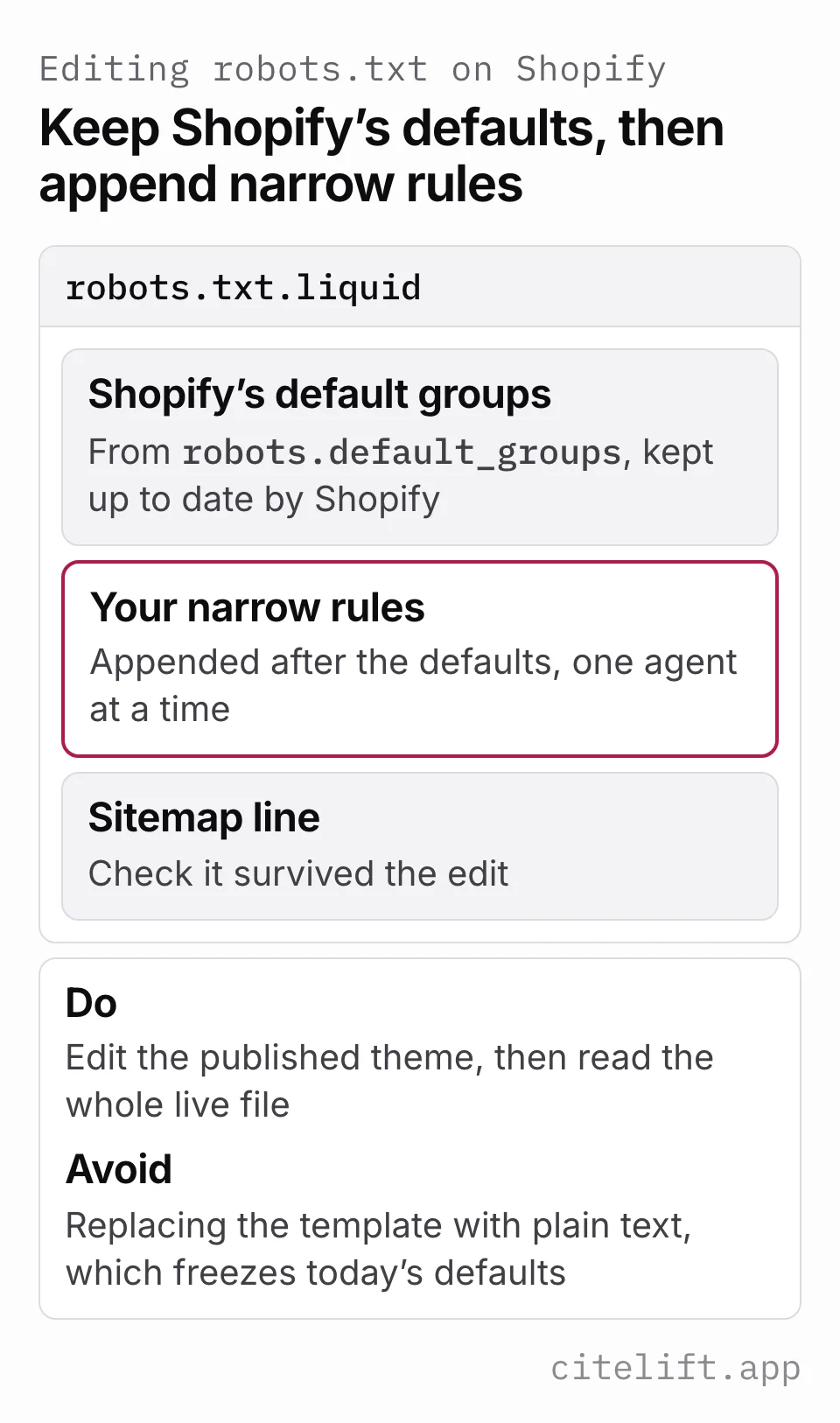
In templates/robots.txt.liquid, render Shopify's live defaults first, then append the narrow group:
{% for group in robots.default_groups %}
  {{- group.user_agent -}}
  {% for rule in group.rules %}
    {{- rule -}}
  {% endfor %}
  {%- if group.sitemap != blank -%}
    {{ group.sitemap }}
  {%- endif -%}
{% endfor %}

User-agent: Google-Extended
Disallow: /
This example is a policy choice, not a recommendation for every store. It preserves the current Shopify default groups instead of copying a dated list into the theme. If the merchant wants to permit these uses, omit the added group or use Allow: / after checking that no more specific rule conflicts.
Record the date, person responsible and reason beside the decision. Then fetch the public file and confirm the block appears once, the default Googlebot group remains intact and the sitemap line survived. A robots rule is directional; it does not prove when a vendor last fetched the site or how quickly a downstream product will react.
How to edit robots.txt on Shopify
Shopify generates the file for you: "Shopify generates a robots.txt file by default, which works for most shops, so this template isn't included in any themes by default" (Shopify, robots.txt.liquid, read 9 September 2026). The template controls three things: the user agent a rule group applies to, the rules themselves, which URLs a crawler can or cannot access, and an optional sitemap URL.
The steps, from Shopify's Help Center (Shopify, Editing robots.txt.liquid, read 9 September 2026):
- From your Shopify admin, go to Online Store
- For the relevant theme, click the menu and then Edit code
- Click Add a new template, and then select robots
- Click Create template
- Make your changes
- Save changes to the
robots.txt.liquidfile in your published theme
Read the two warnings before you touch it. Shopify says "This is an unsupported customization. Shopify Support can't help with edits to the robots.txt.liquid file" and that "Incorrect use of the feature can result in loss of all traffic." It also says replacing the template with plain text is "strongly not recommended, as rules may become out of date."
That last warning is the practical one. Shopify's developer documentation says it strongly recommends using the provided Liquid objects because the default rules are updated regularly. Render robots.default_groups, then append your narrow rules. A plain-text replacement freezes today's defaults while Shopify's managed file can keep changing.
Shopify also documents a separate channel: product data for agentic storefronts that a merchant activates can be syndicated through Shopify Catalog independently of robots.txt. An open-web crawler rule does not disable that feed; its settings must be managed in the relevant agentic storefront configuration (Shopify Help Center, Editing robots.txt.liquid, accessed 10 September 2026).
Two more constraints worth knowing: the template cannot be a JSON template, and it lives in the same Templates folder as the llms.txt.liquid template covered in llms.txt for Shopify.
Verifying the change
curl -s https://yourstore.com/robots.txt
Read the whole output, not the section you added. Confirm the default groups are still there, confirm your sitemap line survived, and confirm nothing carries a broad Disallow: / under a user agent you meant to allow. Then check you edited the published theme, because a robots.txt.liquid sitting in a draft theme does nothing at all and looks exactly like success in the code editor.
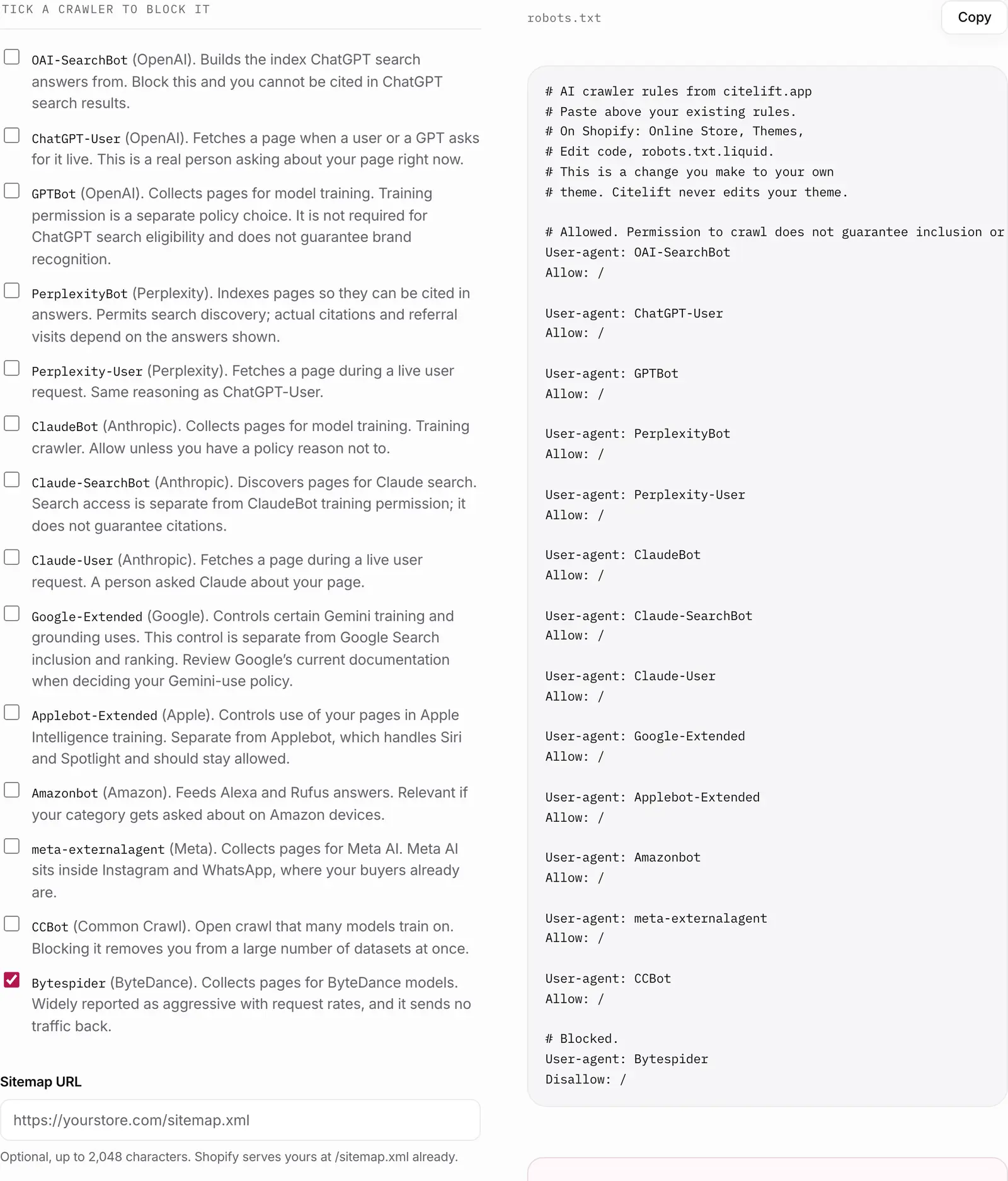
Our robots.txt generator for AI crawlers prints a rule block for the agents above with each vendor's stated purpose next to it, so you can see what you are turning off before you turn it off.
What robots.txt cannot do
It cannot make you retrieved. Allowing every search crawler is permission, not merit. The engine still has to find a page of yours worth reading, which is a content problem, not a configuration one. See what ChatGPT cites when it recommends products for what those pages tend to look like.
It is not a uniform control for user-triggered fetches. ChatGPT's documentation says its robots rules may not apply to ChatGPT-User, and Perplexity says Perplexity-User generally ignores them. Anthropic says blocking Claude-User prevents retrieval in response to a user query. If a page must not be public, use access control rather than robots.txt.
It cannot tell you whether any of this changed an answer. Pick fixed buyer questions that do not contain your brand name, ask them in the services you choose and retain the platform, date, mentions and visible source URLs. The free manual checker prepares questions and analyzes an answer you paste locally; it does not call an AI API. Paid Citelift checks run monthly on Starter and weekly on Core and Growth.
A quick order of work
Half an hour, once, in this order:
- Read your current
robots.txtand note anything already blocked. - Decide your position on training crawlers. Write it down so the next person does not reverse it by accident.
- Decide search and user-triggered access vendor by vendor, recording the documented effect of each rule.
- Add the template to the published theme, using Shopify's default Liquid objects plus your rules.
- Re-fetch the file and read all of it.
- Add llms.txt if you want the tidy index, then stop configuring and start writing.
The configuration ceiling is low, and you will hit it in an afternoon. Everything after that is whether your pages deserve to be quoted. Understanding the difference between a training bot and a search bot, covered in the AI crawler glossary entry and in more detail for ChatGPT's in GPTBot, is most of what robots.txt has to teach a store owner.
Questions.
If I block GPTBot, do I disappear from ChatGPT?
No. GPTBot is the training crawler. OAI-SearchBot governs whether site content can appear in ChatGPT search answers; ChatGPT's documentation says an opted-out site can still appear as a navigational link. Blocking one bot does not block the other.
Does blocking Google-Extended hurt my Google rankings?
Google says it does not affect inclusion or ranking in Google Search. The token controls use for training future Gemini models and for grounding in Gemini Apps and Vertex AI. It has no separate HTTP user-agent string.
Can robots.txt stop an assistant from reading my page when a user asks about it?
Often no. ChatGPT's documentation says that because ChatGPT-User actions are initiated by a user, robots.txt rules may not apply, and Perplexity says Perplexity-User generally ignores robots.txt rules. Anthropic states its bots honour robots.txt directives.
How do I edit robots.txt on a Shopify store?
Online Store, Themes, Edit code, Add a new template, select robots, Create template, then edit and save in your published theme. Shopify's Help Center calls this an unsupported customization and warns that incorrect use can result in loss of all traffic.
Should I write my robots.txt from scratch?
No. Shopify strongly recommends using the provided Liquid objects, because the default rules are updated regularly to keep SEO best practices applied. Add your rules around the default object rather than replacing it with plain text.
Citelift is listed on the Shopify App Store: Citelift on the Shopify App Store.