Guide · updated 9 October 2026 · 9 min read
Shopify title and meta description: where to edit, lengths, examples
Where to edit the title and meta description in Shopify for products, collections, pages, blog posts and the homepage, with length guidance and examples.
Edit a Shopify title and meta description in the Search engine listing section of each product, collection, page or blog post; the homepage's are under Online Store > Preferences. As working lengths, keep the title to about 60 characters and the meta description to about 120 to 160. Shopify allows up to 70 characters in the title, and Google does not publish a fixed limit for either field. The rule for each is one line: the title tells a stranger what the page is, and the meta description tells them what that specific page will help them decide.
Download the title-and-description worksheet and the writing templates with review checklist. The Shopify steps below were checked against the Shopify Help Center on 9 October 2026. The store and product examples are fictional; they show editing decisions, not measured search performance.
How to edit the title and meta description in Shopify admin
Every resource type has its own listing editor, and the labels differ slightly. These are the steps as Shopify documents them.
Product
- From your Shopify admin, go to Products and click the product.
- In the Search engine listing section, click the pencil icon.
- Enter the Page title and the Meta description. The URL handle field sits here too; leave it alone unless you mean to change the address.
- Click Save.
Source: Shopify Help Center, adding and updating products, read 9 October 2026.
Collection
- Go to Products > Collections and click the collection.
- In the Search engine listing section, click the edit icon.
- Fill in Page title and Meta description. Adjusting the URL handle is optional and comes with a redirect choice.
- Click Save.
Source: Shopify Help Center, collection settings, read 9 October 2026.
Page (About, FAQ, size guide)
- Go to Online Store > Pages and click the page.
- In the Search engine listing preview section, click Edit website SEO.
- Enter the Page title and the Description.
- Click Save.
Source: Shopify Help Center, adding keywords for SEO, read 9 October 2026.
Blog post
- Go to Content > Blog posts and click the post.
- In the Search engine listing preview section, click the pencil icon.
- Fill in Page title, Meta description and, if needed, URL handle (no spaces; use dashes between words).
- Click Save.
Source: Shopify Help Center, working with blog posts, read 9 October 2026.
Homepage
- Go to Online Store > Preferences.
- In the Social sharing image and SEO section, enter the homepage title and meta description.
- Click Save.
Source: Shopify Help Center, adding keywords for SEO, read 9 October 2026.
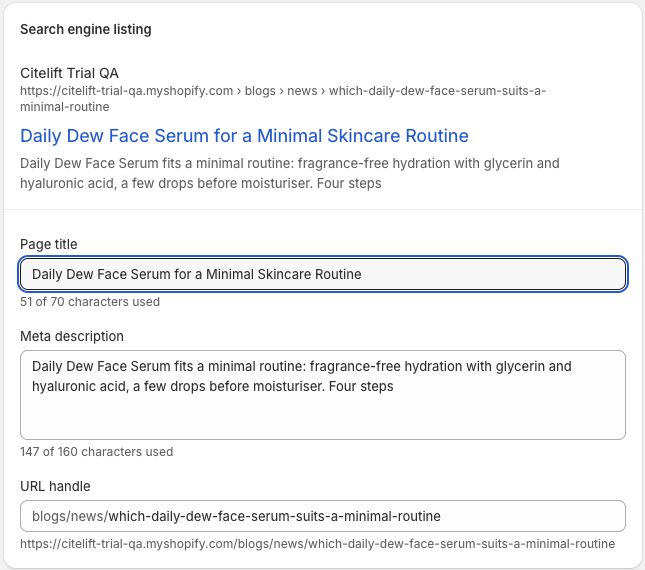
Shopify admin view captured read-only on 10 September 2026 from a Citelift-owned trial QA article with fictional product content. The fields show a 51-of-70 Page title count, a 147-of-160 Meta description count and a /blogs/news/ URL-handle prefix. This is Shopify's preview, not a Google result; nothing was changed or saved during capture.
Admin labels change from time to time. If your screen differs, follow Shopify's current help page rather than this list. If you leave a field empty, your theme prints whatever fallback it was built with, so check the page source instead of assuming.
Length guidance at a glance
Character counts are drafting constraints. Neither Shopify nor Google treats them as ranking rules, and Google does not publish a fixed character limit for titles or descriptions.
| Field | What Shopify says | What Google says | Working range (guidance) |
|---|---|---|---|
| Page title, including the homepage title | Up to 70 characters; consider 60 or fewer to avoid shortened titles | No limit on <title> length; the title link is truncated as needed to fit the device width |
About 50 to 60 characters, most specific words first |
| Meta description | About 160 characters on the SEO help page; the product help page warns that text over 320 characters might be cut off | No limit; the snippet is truncated to fit the device, and Google uses the meta description only sometimes | About 120 to 160 characters, page-specific detail in the first 100 |
Sources: Shopify Help Center, adding keywords for SEO, read 9 October 2026; Shopify Help Center, adding and updating products, read 9 October 2026; Google Search Central, title links, read 9 October 2026; Google Search Central, snippets, read 9 October 2026.
Shopify's two help pages disagree on the description figure, which is a fair hint that the number is approximate. Display is decided in pixels on the searcher's screen. The practical rule holds either way: make the first half of each field useful on its own, so a cut ending loses nothing important.
Know which text you are editing
Three fields look similar but do different jobs:
| Field | Where it appears | Its job |
|---|---|---|
| Visible page title or H1 | On the storefront page | Tell the visitor what the page is |
HTML <title> (Shopify's Page title) |
Browser tab, and one source for search title links | Identify the page concisely |
| Meta description | Page source, sometimes a search snippet | Say why this result answers the query |
They can differ without contradicting each other. An article heading can ask the full buyer question while the SEO title uses a shorter phrasing. Keep the meaning aligned: a title that promises a comparison should lead to a page that compares.
Themes read the admin values through page_title and page_description and print them in the document head (Shopify.dev, SEO metadata, read 10 September 2026). If a custom theme ignores or overwrites those objects, editing the admin field alone will not change the rendered source.
Why Google shows a different title or description
Google says title links are generated automatically. Its sources include the <title> element, the main visible title, headings such as <h1>, og:title, other large and prominent text, anchor text on the page, the text of links pointing to the page, and WebSite structured data. It adjusts titles that are half-empty, obsolete, inaccurate, repeated across similar pages as micro-boilerplate, or that duplicate the site name (Google Search Central, title links, read 9 October 2026).
Descriptions work similarly. Google builds snippets mainly from page content and uses the meta description when it "might give users a more accurate description of the page" (Google Search Central, snippets, read 9 October 2026). Shopify says the same in plainer words: search engines "can choose to rewrite page titles and meta descriptions based on the page content and other signals" (Shopify Help Center, adding keywords for SEO, read 9 October 2026).
So a different result is not proof that the save failed. Check the source first, then look at whether your title is vague, stale or repeated on other pages.
Worked examples for each page type
All five examples use one fictional store, Harbor Thread, which sells travel rainwear. Each fact in a description must appear on that page and stay true for the variants it covers.
Product
Page: the "Tidal" rain shell.
| Draft | Title | Assessment |
|---|---|---|
| Too vague | `Tidal | Harbor Thread` |
| Stuffed | Best Rain Jacket Waterproof Coat Shell Jacket for Travel |
Repetitive and unsupported |
| Better | `Tidal Packable Rain Shell | Harbor Thread` |
- Weak description: "Discover our amazing Tidal collection and shop quality today."
- Better description: "A packable rain shell with taped seams, an adjustable hood and a 310 g packed weight. Check measurements, colours and current availability."
Price and availability change often. Unless your workflow keeps metadata in sync, let the visible product data and structured data carry them. For a catalog-fact workflow, see keeping AI-written product content true and the product-description scorer, which reviews pasted text and does not fetch or validate claims.
Collection
- Visible H1: "Packable rain jackets"
- SEO title:
Packable Rain Jackets for Travel | Harbor Thread - Meta description: "Compare three lightweight rain shells by packed weight, seam construction, hood design and size range. See current colours and availability."
"Compare" is earned only if the page shows comparable facts. If the collection is just a product grid, fix the page before making the promise. The internal-linking guide covers linking articles to collections with anchors such as "compare packable rain jackets".
Page
Page: the size guide.
- Weak title:
Size Guide | Harbor Thread - Better title:
Rain Jacket Size Guide: Chest, Length and Fit | Harbor Thread - Meta description: "Garment measurements for every Harbor Thread rain shell, with how to measure yourself and which styles run roomy enough for a mid layer."
Utility pages are often left on the default. A size, returns or care page that answers a specific question deserves a title that names the question.
Blog post
- Visible H1: "How much waterproofing does a city rain jacket need?"
- SEO title:
City Rain Jacket Waterproofing: What to Check - Meta description: "How seam construction, fabric ratings, hood fit and trip length affect a city rain-jacket choice, with a practical comparison checklist."
The description previews the real sections and avoids "complete" or "ultimate". The Shopify blog SEO checklist covers headings, images, author data and internal links around the listing, and the blog SEO audit flags structural gaps in pasted content.
Homepage
- Weak title:
Ready for Anywhere | Harbor Thread - Better title:
Packable Rainwear and Travel Layers | Harbor Thread - Meta description: "Packable rain shells and travel layers with garment measurements, material details and care instructions. Compare current styles from Harbor Thread."
A homepage title made only of a slogan tells an unfamiliar searcher nothing. Say what the store sells, then the brand.
Create scalable patterns without identical boilerplate
Hand-edit the pages that already earn impressions or matter most commercially. For the rest, build patterns from real fields, with a fallback when a field is empty:
- Product title:
[Product name] [distinguishing type or fact] | [Brand] - Collection title:
[Category shoppers use] | [Brand] - Product description:
[Product type] with [two verified facts]. Check [decision detail] and current availability. - Collection description:
Compare [category] by [two useful dimensions]. Explore [range boundary] and current availability.
Never print empty separators, placeholder words or a doubled brand name. Google encourages programmatic descriptions for large database-driven sites, and also says "identical or similar descriptions on every page of a site aren't helpful" (Google Search Central, snippets, read 9 October 2026). Review a sample from every template and edge case before rolling a pattern out.
If two pages keep converging on the same title, synonyms will not separate them. Use the Shopify topic-map guide to give each page a distinct reader task, and the buyer-question mapping worksheet to decide which page answers which query.
Verify the published result
After saving, open the public URL and view the page source. Find the <title> and <meta name="description"> in the head and compare them with your worksheet. Confirm there is one of each, the canonical is correct, and the H1 makes the same promise.
Then:
- Check the page renders properly on mobile and desktop.
- Inspect the URL in Search Console and request indexing only when the page is ready.
- Record the change date and the query group it targets.
- Wait. Shopify says you "might need to wait a couple of weeks" for edits to show in results (Shopify Help Center, adding keywords for SEO, read 9 October 2026).
- Review impressions, clicks and click-through rate alongside position and query mix.
The Search Console setup and query-review guide walks through the property, sitemap and page-level checks. Do not rewrite accurate metadata every few days because one query showed different text.
Keep the evidence honest
A new title can coincide with a change in click-through rate, but seasonality, rankings, competitors and query mix move too. Note the before-and-after window and any other releases. A title or description does not guarantee indexing, a fixed search appearance, higher rankings, assistant citations or sales.
Clear page identity and concrete facts help any reader, including AI retrieval, but there is no special AI title field or schema. SEO, AEO and GEO for ecommerce covers where those practices overlap and where the evidence runs out, and the storewide Shopify SEO checklist puts titles in the context of a full template review.
Questions.
How long should a Shopify meta description be?
Shopify's SEO help page recommends about 160 characters. Google does not publish a fixed limit; it truncates snippets to fit the device. Aim for roughly 120 to 160 characters and put the page-specific detail in the first 100, so the useful part survives if the end is cut.
How long should a Shopify meta title be?
Shopify lets you enter up to 70 characters and suggests 60 or fewer to avoid shortened titles. Google says there is no limit on title length but truncates title links to fit the device width. Treat about 60 characters as an editing guide, not a ranking rule.
Where do I change the homepage title in Shopify?
Go to Online Store > Preferences in the Shopify admin. Shopify's help page, read on 9 October 2026, puts the homepage title and meta description in the Social sharing image and SEO section there. Click Save, then check the live page source.
Why does Google show a different title from the one I set in Shopify?
Google generates title links automatically and can draw on headings, prominent text, anchor text and other signals, not only the title tag. It adjusts titles that look empty, outdated, inaccurate or repeated. First confirm your title appears in the page source; a different search result does not mean Shopify failed to save it.
Can I reuse one meta description across every product?
Avoid it. Google says identical or similar descriptions on every page are not helpful. For a large catalog, a careful pattern that pulls real, page-specific facts is better than one line of boilerplate.
Citelift is listed on the Shopify App Store: Citelift on the Shopify App Store.