Guide · updated 9 October 2026 · 12 min read
Google AI Overviews for Shopify: get included and track it
How a Shopify page gets into Google AI Overviews and AI Mode, what 35 overviews linked on 9 October 2026, and how to track inclusion honestly.
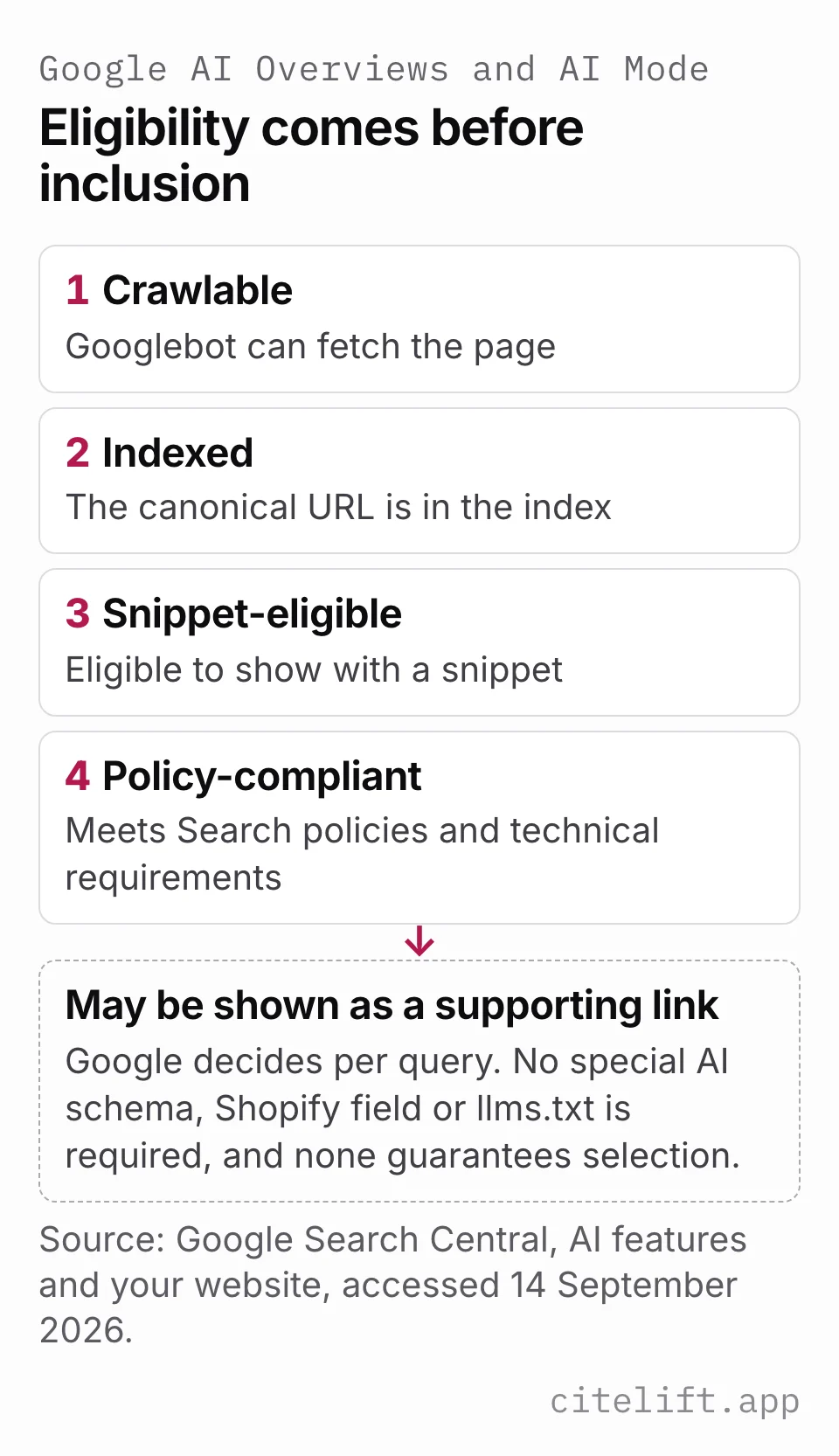
There is no separate way to apply for Google AI Overviews: a Shopify page gets in through ordinary Search. Googlebot must be able to crawl it, it must be indexed and eligible to show with a snippet, and then Google's systems decide whether it helps answer the query better than other pages. Google says no special schema, AI text file or markup is needed. Meeting those conditions is eligibility, not inclusion, so measure the two separately: Search Console for the impressions Google reports, and a dated weekly check of the actual overview when you need to see which pages it linked.
This guide uses Google documentation read on 9 October 2026, one original capture of 35 Google US results with AI Overviews taken the same day, and clearly labelled synthetic exports. It did not open a merchant Search Console account and does not claim that any live Shopify store appeared in either feature.
Separate AI Overviews from AI Mode
AI Overviews appear within classic Google Search when Google's systems decide an overview adds value. They do not appear for every query. AI Mode is a conversational Search experience intended for nuanced questions, comparisons and follow-up exploration.
Google says both features can fan one request out into several related searches, but they may use different models and techniques. Their responses and supporting links can therefore differ. Google's AI features guidance, read 14 September and again 9 October 2026.
Use distinct manual-capture values such as Google Search / AI Overview and Google Search / AI Mode. Do not combine them into a generic “Google AI rank” when the observation came from one surface. The AI visibility measurement guide explains the fixed-panel method.
Check eligibility before looking for inclusion
Google's stated requirements are ordinary Search requirements:
- Googlebot must be able to crawl the page.
- The page must be indexed.
- It must be eligible to appear with a snippet.
- The content must comply with Search policies and technical requirements.
There is no special AI schema, Shopify field or llms.txt requirement. Google's AI features page says "There are no additional technical requirements" and that you do not need "new machine readable files, AI text files, or markup" (Google Search Central, AI features and your website, read 14 September and again 9 October 2026). Its optimisation guide goes further: "optimizing for generative AI search is optimizing for the search experience, and thus still SEO", and structured data "isn't required for generative AI search" (Google Search Central, Optimizing your website for generative AI features on Google Search, read 9 October 2026).
For a store, the same guide names one ecommerce-specific input: Merchant Center feeds and Business Profiles "can help your products and services to be visible in both AI responses and other Google Search results". Accurate visible text, useful internal links, suitable media and structured data matching the page remain relevant, but none of them guarantees selection.
Inspect the canonical Shopify URL in Search Console. If it is missing, follow the Shopify indexing diagnostic before running prompt checks. A page that is not indexed cannot be a supporting link under Google's documented eligibility rule.
The Google-Extended token controls some Gemini training and grounding uses outside Search. Google says Googlebot and Search preview controls such as noindex, nosnippet, data-nosnippet and max-snippet govern Search AI features. Changing Google-Extended is not an indexing or AI Overview optimization.
What 35 AI Overviews cited in October 2026
On 9 October 2026 we captured 35 Google results pages through DataForSEO's SERP API: Google US, English, desktop, 100 organic results deep, with AI Overviews loaded. We chose the queries from our own keyword research for this site. 13 name Shopify (such as "shopify seo", "shopify schema" and "llms.txt shopify"), 17 are about AI visibility (such as "how to rank in ai overviews", "ai overview tracker" and "aeo vs geo") and 5 are about SEO and content tools (such as "ai blog writer" and "ai product description generator").
Every one of the 35 pages showed an AI Overview. Together they linked 324 distinct pages, counted once per overview: between 3 and 14 per overview, with a median of 10. The count includes the source cards and any link inside the answer text, as the API returned them, so five of the 324 were links to Google's own tools such as Search Console and the Rich Results Test.
| Domain | AI Overviews linking it (of 35) |
|---|---|
| youtube.com | 27 (77%) |
| reddit.com | 11 (31%) |
| shopify.com | 8 (23%) |
| apps.shopify.com | 7 (20%) |
| ahrefs.com | 6 (17%) |
| linkedin.com | 5 (14%) |
Eight more domains were linked by four overviews each, including help.shopify.com, searchengineland.com, zapier.com and seranking.com. Counting every Shopify-owned host together (shopify.com, apps.shopify.com, help.shopify.com, community.shopify.com and shopify.dev), 14 of the 35 overviews linked at least one, and all 13 overviews for the queries that name Shopify did.
The more useful finding for a store is how loosely the links tracked the organic results. 264 of the 324 links (81%) were not among the top 10 organic results for the same query, and 19 of the 35 overviews linked nothing from that query's top 10. For "how to rank in ai overviews", the overview linked 14 pages: 6 were in the organic top 10 and 7 were YouTube videos or Shorts. The capture keeps only the top 10 organic results per query, so it cannot say whether the other pages ranked between 11 and 100, and a YouTube video that showed in a video block rather than as an organic result counts as outside the top 10.
A rough page-type split of the 324 links, classified from the URL alone and therefore heuristic: blog posts and guides 94 (29%), YouTube videos 65 (20%), Shopify App Store pages 24 (7%), forum, social and community posts 23 (7%), official docs and help pages 16 (5%), and 102 (31%) that were product pages, tool pages or could not be classified from the URL.
Download the AI Overview citations CSV for 9 October 2026. It has one row per query with its theme, whether an overview appeared, the domains it linked (semicolon-separated, in the order returned) and the domains of the top three organic results.
Read it with its limits. Each query was captured once, from one US desktop location, on one date, through a third-party API rather than a signed-in browser. AI Overviews can differ by user, location and time, and the same query can produce a different overview on a later run. This is not a ranking study, it covers 35 queries chosen by us rather than a sample of all Shopify searches, and nothing in it shows that any page was linked because of its format, its domain or its position.
How to track whether your store appears in AI Overviews
Start with what Google reports. Google says sites appearing in AI Overviews and AI Mode "are included in the overall search traffic in Search Console" and are reported "in the Performance report, within the 'Web' search type" (Google Search Central, AI features and your website, read 9 October 2026). So AI feature clicks and impressions sit inside your normal Web totals rather than in a search type of their own.
The dedicated generative AI performance report separates impressions only. Google defines them as "how many times links to your site were shown to a user in a generative AI feature on Google Search", grouped by page, country, date and device (Search Console Help, Generative AI performance report (Search), read 9 October 2026). It has no query dimension and no clicks. So Search Console can tell you that a product page was shown in an AI feature last week; it cannot tell you for which search, whether it was an AI Overview or AI Mode, or whether anyone clicked. The next section covers reading that report without double counting.
To see the overview itself, run a small manual check once a week:
- Pick 10 to 20 queries. Start from queries where your pages already earn impressions in the Performance report, since Google's eligibility rules are ordinary Search rules, and add the buyer questions you most want to answer.
- Run them on the same weekday, in the same country, on the same device class and in the same signed-in or signed-out state each time. Write those conditions in the sheet.
- Expand the overview and its full source list before recording anything.
- For each query, record whether an overview appeared, whether any link went to your domain, which URL it was, and the other domains linked. Save a screenshot.
- Record "no overview", "overview without your link" and "did not load" as different states. Read the result over several weeks, not from one absence.
The blank AI visibility capture sheet has columns for this, and the manual panel section below covers AI Mode and branded questions.
Third-party AI Overview trackers automate the same method: they run a query list on a schedule from a set location and store whether an overview appeared and what it linked. In our capture, the overview for "ai overview tracker" linked 11 pages, all published by tracking-tool vendors, and none of the 11 was in that query's organic top 10. Before trusting any tracker, ask which location, device and signed-in state it uses, how often it repeats each query, and whether it keeps the overview text and the full source list. When we checked vendor pages on 9 October 2026, Otterly.AI, Peec AI, SE Ranking, LLMrefs and Rankscale listed Google AI Overviews among the engines they track, Ahrefs listed it for its AI Visibility Index, and Profound's trial included it. Our roundup of AI visibility tools for ecommerce compares them.
Read Google's dedicated report precisely
Google announced its Generative AI performance report (Search) on 3 June 2026 and states that, as of 31 August 2026, the insights had rolled out worldwide. The report includes impressions for AI Overviews and AI Mode. Google's announcement, accessed 14 September 2026.
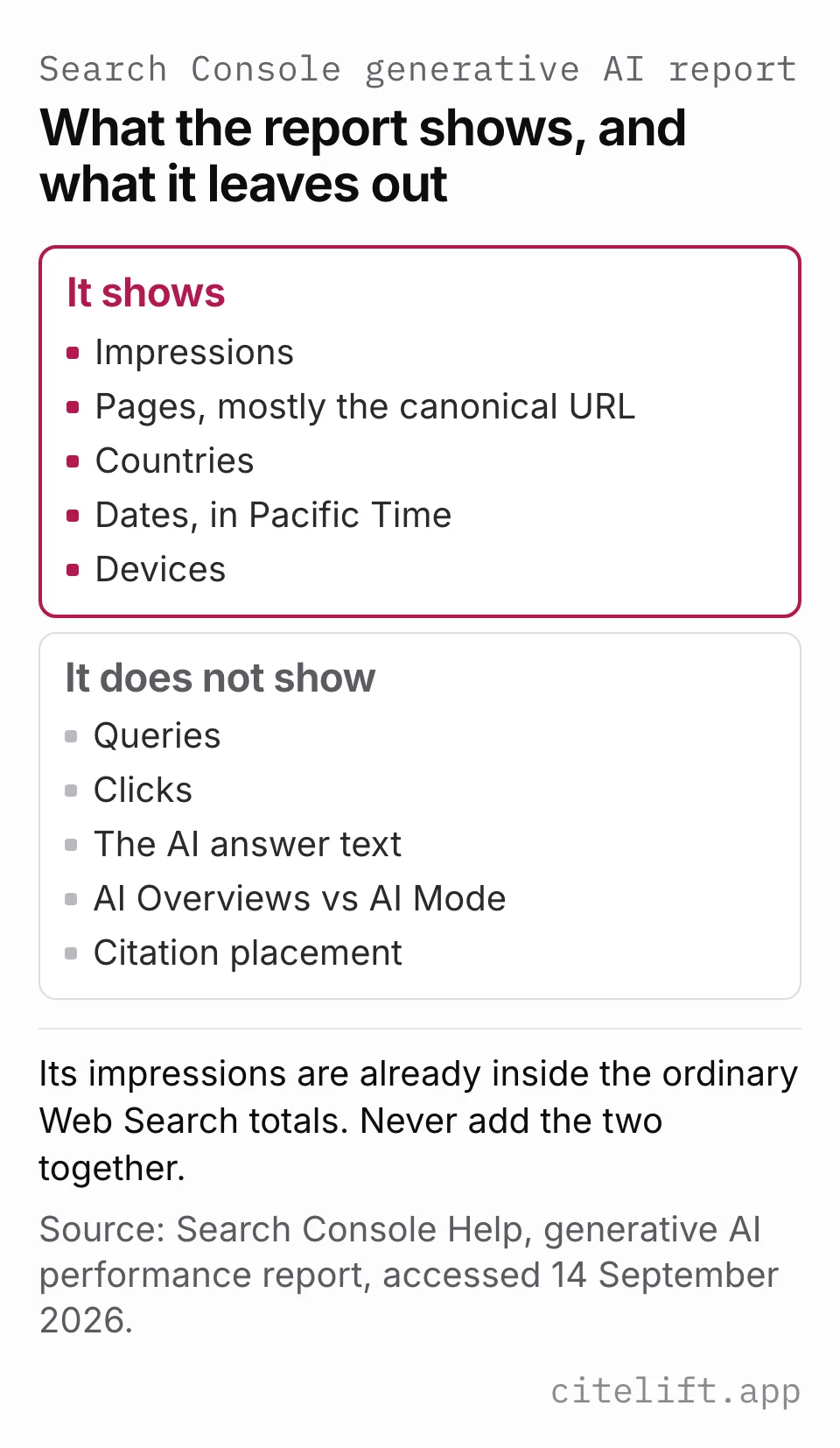
The report answers a narrow question: when were links to this property shown in supported generative AI features on Google Search? It currently exposes:
- impressions;
- pages, assigned mostly to the canonical URL;
- countries;
- dates in Pacific Time;
- devices.
It does not provide a query dimension, click counts, exact AI answers, a split between AI Overview and AI Mode, or citation placement. It excludes experiments in Search Labs. Its impressions are also included in the ordinary Web Search performance totals, so adding the dedicated report total to overall Web impressions would double count them.
The same help page says a missing report usually means the site "hasn't received enough impressions in generative AI features on Google Search", and it also lists a site excluded from Search generative AI features as a cause. On 14 September 2026 it still named incomplete access rollout as a further reason; on 9 October 2026 that reason was no longer listed. Treat “report not visible” as unavailable evidence, not proof of zero inclusion. Search Console Help, Generative AI performance report (Search), read 14 September and again 9 October 2026.
Download the blank Google generative AI report sheet. The synthetic example contains an invented property chart total and page rows whose sum is lower, demonstrating why the two grains must remain separate. It is not a customer report.
Export a reproducible Search Console view
Choose a completed date range and write it in the file. Avoid a period whose newest data is still marked preliminary. Then:
- Open the generative AI performance report for the correct property.
- Record whether the report is visible before interpreting an empty table.
- Select the page dimension and export the chart and table.
- Preserve any UI values shown as
~or-before exporting, because Google says those unavailable values export as zero. - Keep the chart total as the property-level total. Do not sum page rows as a substitute: the chart is property-aggregated, page rows are page-aggregated, and the table/export is limited to 1,000 rows.
- Repeat for country or device only when that question matters.
- Save the property, export time, range and whether preliminary data was included.
- Keep the raw export unchanged and do calculations in a copy.
Compare equal-length windows and the same dimensions. A rise after publishing is an observation, not proof that the article caused the change. Search demand, product seasonality, Google's systems and competitors can all move impressions.
An impression also is not a click. Google's ordinary Performance report includes AI-feature traffic within its combined Web metrics, while the dedicated report exposes only impressions. Without dedicated clicks, a query dimension or a surface dimension, you cannot calculate an AI Overview click-through rate or name the prompt that produced an impression from this report alone.
Add a manual surface panel when context matters
Search Console cannot show the answer wording or distinguish the two supported features. Build a small, fixed manual panel when those details matter:
- five to ten nonbrand buyer questions tied to real catalog decisions;
- a separate set of branded questions;
- one market, language, device class and signed-in state per series;
- exact surface, date/time and repeat number;
- whether an AI Overview appeared;
- in AI Mode, the initial question rather than later follow-ups unless follow-ups have their own IDs;
- brand mention and each visible owned-domain link as separate fields.
Run the prompts manually in the consumer surfaces and record only what you actually observed. Citelift's manual checker generates five nonbrand question templates from the category, product type and market you enter. It can then analyze one answer you paste for an exact brand-name match and full URLs on the store's domain or subdomains. The analysis runs in the browser and makes no AI API request. It does not run the questions, identify which links the platform presented as citations, or verify source support, so preserve those fields from the original surface. Paid connected-store visibility checks are a separate merchant workflow and must not be described as the free tool.
Use the blank AI visibility capture sheet. Its synthetic example shows a mention without an owned-domain link, a linked answer, a timeout and a valid zero. All names, URLs and outcomes are invented.
Keep five outcomes separate
Google AI measurement crosses several systems, and each stops at a different point:
| Evidence | What it supports | What it cannot prove |
|---|---|---|
| Indexed and snippet-eligible | The page meets Google's stated entry condition | It appeared in an AI feature |
| Dedicated-report impression | A site link was shown in a supported Google generative AI feature | Which query or surface produced it, or whether it was clicked |
| Manual brand mention | A chosen surface named the brand for one recorded prompt | An owned page was linked |
| Manual owned-domain link | The recorded answer visibly linked to the store | A shopper clicked or bought |
| Identifiable referral session | Analytics recorded a later visit under its referrer or channel rule | Which impression or answer produced it, or whether missing referral data means no influence |
| Article-attributed order | Commerce data matched the article's stated touch window and credit rule | A Google AI impression or manual answer caused the order, or that the order was incremental |
For the wider source inspection, use what ChatGPT cites as a classification model while keeping Google observations in their own series. For orders, use the Shopify article attribution guide and state its seven-day rule rather than converting impressions into revenue.
Write a defensible monthly note
Synthetic reporting example: “For August, the dedicated Google report showed 57 property-aggregated chart impressions. Two visible fictional page rows summed to 54, which was not substituted for the property total. It did not provide queries, clicks or a split between AI Overviews and AI Mode. In a separate invented ten-prompt manual panel, three valid AI Overviews appeared and one linked the fictional store.” Those numbers are arithmetic examples, not customer results.
If the report is missing, say “dedicated report unavailable for this property” and retain the ordinary Web report plus manual panel. If the manual surface did not trigger an AI Overview, record a valid no-overview observation for that prompt. If the request failed, record unavailable. Those states should never collapse into one zero.
Questions.
Can I track AI Overviews in Search Console?
Partly. Google counts AI Overview and AI Mode appearances inside the ordinary Performance report under the Web search type, and the dedicated generative AI performance report shows impressions by page, country, date and device. Neither tells you which query produced an AI Overview impression, whether it was clicked, or what the answer said, so a dated manual check is still needed for that.
Does schema get me into AI Overviews?
No. Google says there is no special schema.org markup to add for its generative AI features and that structured data is not required. Structured data is still worth keeping accurate for ordinary Search features, and it should match the visible text on the page.
Do AI Overviews only link pages from the organic top 10?
Not in our capture. Across 35 Google US results captured on 9 October 2026, 264 of the 324 distinct links shown in AI Overviews were not in the organic top 10 for the same query. That is one capture on one date, so treat it as an observation rather than a rule.
Are AI Overviews and AI Mode the same Google surface?
No. AI Overviews appear selectively within classic Search results. AI Mode is a separate conversational Search experience for more involved exploration. Google says they can use different models and techniques, so their answers and links can differ.
Can I report AI Mode separately from AI Overviews?
Not from the current dedicated report. Google lists both as included capabilities but reports their impression activity together. Keep dated manual observations in separate rows when surface-level comparison matters.
Citelift is listed on the Shopify App Store: Citelift on the Shopify App Store.